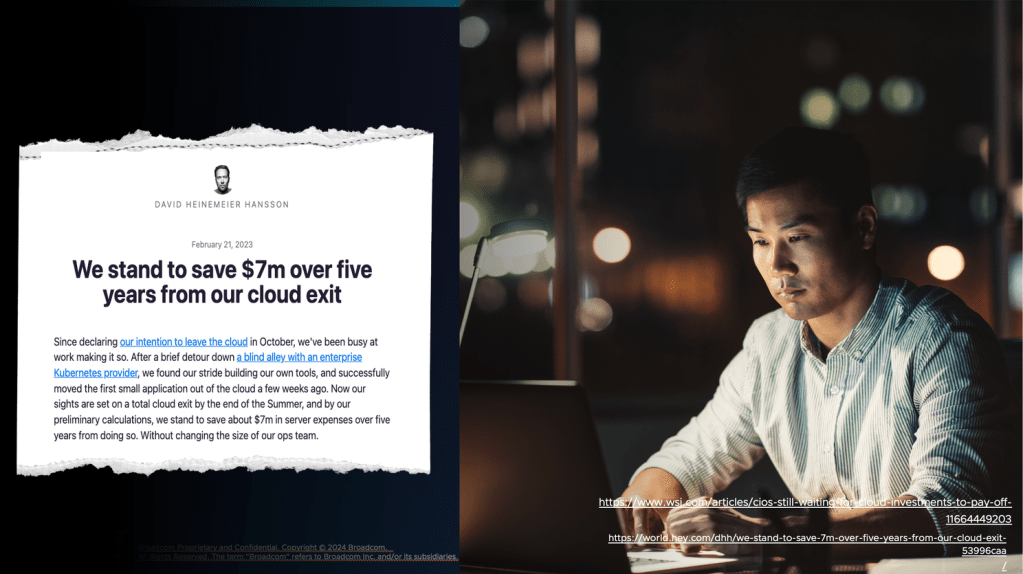
Workloads are moving back from the Cloud. #vExpert Gabi Nunes talks about his trending blog article that covers what you need to do to bring workloads back, and why!
Category: Cloud
VMware Cloud Foundation 9.0 Architecture, Operations and Best Practices
VMware Cloud Foundation (VCF) 9.0 introduces major architectural and operational enhancements for modern private cloud deployments. This article provides a technical deep dive into its core themes, covering architecture models, operational concepts, networking, storage, and key best practices relevant for enterprise IT teams and architects.
Core Architecture Themes
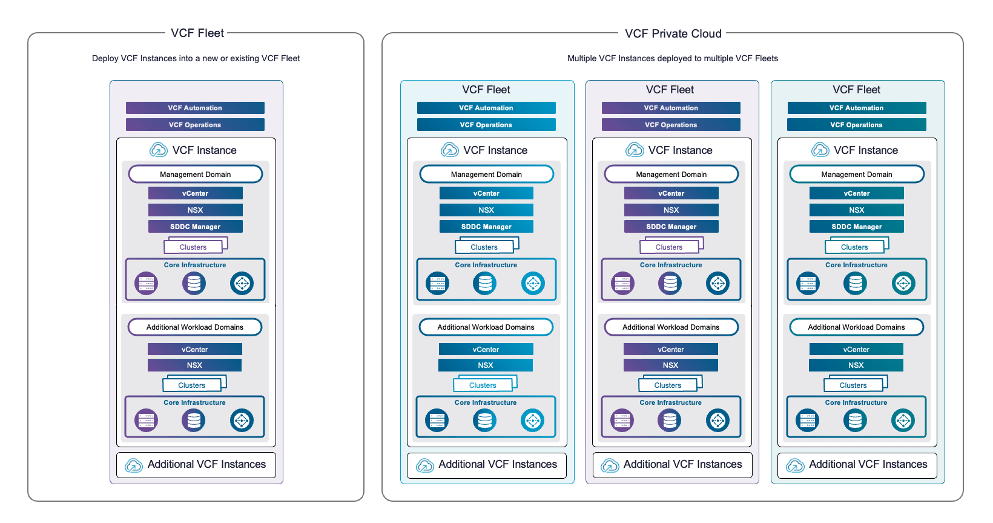
VCF 9 builds on refined domain-based architecture, enabling seamless scalability for both management and workload clusters. The solution is comprised of VCF Instances, each containing a management domain and multiple workload domains, all orchestrated through SDDC Manager. Version 9 brings more flexible fleet management to coordinate multiple instances, offering unified automation and life cycle control.
Diagram: Multi-instance VCF Architecture
Fleet Management
├─ VCF Instance 1
│ ├─ Management Domain (vCenter, NSX, SDDC Manager)
│ └─ Workload Domains (Clusters, Storage)
└─ VCF Instance 2
├─ Management Domain
└─ Workload Domains

Architecture Best Practices
| Area | Best Practice |
|---|---|
| Domain Design | Separate management and workload clusters for resilience |
| Topology | Employ multi-rack, multi-site for high availability and failover |
| Fleet Management | Use automated, centralized operations for upgrades and patching |
Operations and Automation
Operations in VCF 9 revolve around centralized life cycle management and automated monitoring. VCF Operations features single UI dashboards for fleets, intelligent log analytics, and sophisticated monitoring, integrating seamlessly with Aria Operations and leading SIEM platforms. Automated upgrades can be performed with zero downtime leveraging new live patching capabilities

Recommended Operational Workflows
| Workflow | Recommended Tool/Service | Description |
|---|---|---|
| Fleet Management | SDDC Manager, VCF Automation | Centralized patching, configuration, upgrades |
| Monitoring and Log Analysis | Aria Operations/Log Insight | Correlated logs, health checks, capacity analysis |
| Automation and API Integration | PowerCLI, REST, Terraform | Infrastructure-as-Code for deployments and recovery |
Networking and Security
Networking in VCF 9 leverages NSX-T’s powerful overlay model. NSX Federation allows multi-site policy enforcement, network segmentation, and rapid disaster recovery across interconnected VCF Instances. Security is enhanced by full-stack RBAC, MFA integration, and continuous compliance monitoring using built-in SDDC Manager audit modules.
Diagram: NSX Federation Multi-site Model
text [NSX Federation]
├─ Site A (Local NSX)
└─ Site B (Local NSX)
│
[Global Policy Enforcement]
Security Recommendations
| Technology | Best Practice | Rationale |
|---|---|---|
| NSX Federation | Global policies, microsegmentation | Tenant isolation and rapid DR |
| Identity Broker | SSO, MFA | Enhanced authentication |
| Compliance | Periodic audits, drift management | Maintain regulatory posture |
Storage Innovations
VCF 9 centers storage architecture around vSAN Express Storage Architecture (ESA), supporting end-to-end NVMe, global deduplication and compression, and cross-cluster “HCI Mesh” sharing. Clusters may also integrate legacy NFS or Fibre Channel storage for hybrid deployments. Always size clusters based on workload IOPS/latency targets, and validate network links (10GbE+ recommended).
| Storage Model | Main Benefits | Key Considerations |
|---|---|---|
| vSAN ESA | High performance, simplified ops | 10GbE or higher required |
| NFS/Fibre Channel | Legacy integration, flexibility | Latency and compatibility |
| HCI Mesh | Flexible cross-cluster sharing | Topology planning needed |
Key Enhancements & Practical Tips
- Unified Licensing: Subscription simplifies entitlement management.
- Workload Domain Flexibility: Partition workloads by function, location, or business unit for optimised governance.
- Automation First: Use API-based provisioning for all config and expansion tasks to improve repeatability and reduce errors.
- Proactive Security: Regularly configure and monitor RBAC, SSO, certificate expiry, and compliance status.

Design Decisions for VMware Cloud Foundation
This post outlines critical design decisions architects should consider when planning and deploying VMware Cloud Foundation (VCF).

1. VCF Constructs and Architecture
VCF private cloud is composed of hierarchical constructs with clear management responsibilities:
- VCF Instance: Includes a management domain and optional workload domains with core components such as vCenter, NSX, SDDC Manager, and ESX hosts.
- VCF Fleet: Manages one or more VCF Instances along with fleet-level components like VCF Operations and VCF Automation.
- VCF Private Cloud: Represents the highest level aggregating one or more VCF Fleets.
Architects must design with these constructs in mind, determining how many instances and fleets are needed based on scale, organizational boundaries, and operational models.
2. VCF Operations Deployment Models
VCF Operations is the central management console with deployment options affecting availability and recovery:
- Simple Model: Single node, minimal footprint. Suitable for small environments but slower recovery after failures.
- High Availability (HA) Model: Three-node cluster with rapid failure recovery and optional external load balancer for scaling.
- Continuous Availability Model: Dual nodes across availability zones providing no service interruption upon failure, suitable for multi-site deployments.
Choose the appropriate model balancing resilience requirements and cost.
3. Workload Domain and vSphere Cluster Models
Workload domains segregate resources for applications and can contain one or more vSphere clusters.
- Management Domain: Contains core management appliances and fleet components. It may also run workloads if needed.
- Workload Domains: Run customer applications, isolated by separate vCentres and Single Sign-On domains if required.
vSphere clusters are selected based on availability:
- Single-Rack: Suitable for minimal footprint, fault domain within a rack.
- Multi-Rack (Layer 2 or 3): Spans multiple racks with fault isolation for higher availability.
- Stretched Clusters: Extend across availability zones for resilience against site failures.
4. Networking and Distributed Switch Models
Networking underpins the entire platform with design options affecting performance and isolation:
- Distributed Switch Models: Range from a single switch supporting all traffic to complex models separating storage, workload, and management traffic onto different switches for maximum bandwidth and isolation.
- Network Fabric Models: Options include single-rack, multi-rack, or availability zone fabrics supporting different cluster models.
- Fleet-Level Networking: Choices include shared or dedicated management networks and overlay or VLAN NSX segments.
Design for scalability, security, and operational simplicity when selecting switch and fabric models.
5. Storage Architecture and Models
VCF supports various principal and supplemental storage models:
- vSAN ESA and OSA: Provide hyperconverged storage with one-tier or two-tier architectures using NVMe or mixed disk types.
- External Storage: Fibre Channel or NFS arrays can be integrated via supplemental datastores.
- Storage Clusters: Disaggregated storage clusters provide flexibility for scaling storage and compute independently.
Selection depends on performance needs, availability targets, and existing storage infrastructure.
6. Identity and Authentication Models
Authentication uses VCF Identity Broker and Single Sign-On services:
- Identity Broker Models: Embedded within vCenter for simplicity or as a dedicated appliance cluster for higher availability.
- Single Sign-On Models: Scale from per-instance to fleet-wide brokers based on scale and isolation needs.
Design identity services to avoid single points of failure and enable seamless access across VCF components.
7. Supervisor and Kubernetes Integration Models
vSphere Supervisor enables Kubernetes workload management with options including:
- Management Zones: Single or three-zone models for control plane availability and workload isolation.
- Control Plane Availability: Simple (single node) or HA (three nodes) control planes.
- Load Balancers: NSX, Avi, or Foundation Load Balancer based on networking model and scalability requirements.
Architects must balance resource allocation, operational complexity, and Kubernetes workload expectations.
8. Design Blueprints and Expansion Paths
Pre-defined design blueprints provide prescriptive architectures for common use cases:
- Single site minimal footprint for small-scale deployments.
- Single site with multi-rack and high availability.
- Multi-site designs across regions with disaster recovery considerations.
VCF enables flexible expansion by adding hosts, clusters, workload domains, or instances, supporting evolving business and technical needs.
Upgrading a vSphere 8.x Environment to VMware Cloud Foundation 9.0: In-Depth Guide

Introduction
Upgrading legacy vSphere environments to VMware Cloud Foundation (VCF) 9.0 is a strategic move for organizations seeking unified management, advanced automation, and simplified fleet operations. This comprehensive walkthrough details each stage of such an upgrade, leveraging an existing Aria Suite Lifecycle Manager installation and Aria Operations, culminating in an enterprise-grade, converged VCF 9.0 fleet.
Step 1: Preparing the Aria Suite Lifecycle Manager
Begin by assessing the Aria Suite Lifecycle Manager version in use. If running version 8.18, ensure Patch 2 is applied. Patch 2 is critical—it brings foundational awareness of VCF 9.0, enabling downstream upgrade operations. The patch must be retrieved from the Broadcom Software Portal, manually transferred to the Lifecycle Manager appliance, and mapped using its binaries feature. Note: Applying this patch triggers an automatic appliance reboot. Verify both version and patch level post-application to ensure readiness.
Step 2: Upgrading Aria Operations and Deploying Fleet Management
With Patch 2 in place, initiate the upgrade of Aria Operations to version 9.0. This process requires uploading two key artifacts to the Lifecycle Manager: the Aria Operations 9.0 upgrade package and the Fleet Management OVA template. Use the Lifecycle Manager’s binary mapping to make these accessible for the operation.
Select the correct license type for your intended deployment (VCF or VVF), as licensing governs feature enablement within Fleet Management. Launch the upgrade workflow, perform the pre-upgrade assessment, and follow best practice: do not proceed on failed pre-checks—remediate all detected issues first.
Upon workflow initiation, the Aria Operations cluster will be brought offline and a snapshot taken. The deployment prompts for vCenter information to place the Fleet Management appliance correctly within the infrastructure, including network, DNS, NTP, and access credentials. Complete a thorough pre-check to verify environmental health before proceeding.
Upon successful deployment, confirm the following:
- Aria Operations is now version 9.0, integrated with Fleet Management.
- The previous Operations instance is deregistered from the Lifecycle Manager and re-registered with Fleet Management.
- The Lifecycle Manager will continue managing components such as Aria Operations for Logs and VMs, running in parallel until a full environment transition is complete.

Step 3: Upgrading the vSphere Layer
Proceed to upgrade vCenter Server using the official ISO and the vCenter Upgrade Wizard, utilizing the reduced downtime process. This method temporarily stands up a target vCenter appliance, replicates the configuration and data, and eventually assumes the original identity and network configuration. Carefully validate the new vCenter instance post-upgrade.
To upgrade ESXi hosts, use the vSphere Lifecycle Manager (VLCM) to import the ESX 9.0 image depot (ZIP archive), create a new cluster image, and assign it to the cluster. Remediate the cluster by initiating compliance and update operations, which will:
- Place each host into maintenance mode (evacuating VMs as needed)
- Install and boot the new ESXi version
- Return hosts to the cluster sequentially via DRS scheduling
Repeat for all cluster hosts, ensuring all are running ESXi 9.0.
Step 4: Deploying and Configuring the VCF Installer
Next, deploy the VCF Installer by uploading and powering on the SDDC Manager OVA. This appliance replaces the legacy Cloud Builder and initially runs in installation mode. For binary acquisition, configure either an online or offline depot. For online depots, authenticate using a Broadcom software token; for offline deployments, establish a local web server and stage binaries as needed.
With binaries available, use the deployment wizard to:
- Deploy a new VCF fleet or add to an existing fleet
- Specify usage of existing infrastructure (operations, vCenter, automation)
- Assign deployment models: simple (single-node) or high availability (three-node clusters per management component)
Provide all required instance configuration parameters, opt for password auto-generation or manual assignment, and link the existing upgraded Aria Operations 9.0 instance and Fleet Management using credentials and API integrations.

Step 5: Automation, NSX, and Management Domain
If no prior VCF Automation instance is available, opt to deploy a new one by supplying the necessary appliance and networking details. For NSX Manager, select the deployment type and provide configuration for cluster and appliance FQDNs, passwords, and overlay options. For production, best practice dictates isolating overlay networking on separate physical interfaces; use the management kernel network overlay only for non-production or transitional scenarios.
Step 6: Final Convergence and Deployment
Complete the installer inputs—optional download or editing as JSON for future automated deployments. Validate the configuration, reviewing and acknowledging warnings (after careful assessment), and ensuring all errors are cleared before proceeding.
Monitor the deployment workflow in real-time; the entire process may take from 90 minutes to four hours depending on environment size and redundancy. If failures occur, utilize built-in retry and diagnostics to resolve and continue.
After deployment, verify:
- The environment inventory reflects new resource pools and grouped management components (SDDC Manager, vCenter, Operations Collector, Automation)
- Fleet Management and Operations dashboards indicate accurate status and registration
- Existing workloads remained running and non-disrupted during the convergence (with minimal exceptions for inventory and service creation)
Conclusion
This process transforms a loosely coupled vSphere 8.x setup into a tightly integrated VCF 9.0 fleet, delivering unified lifecycle management, streamlined upgrades, and consistent automation. The outlined steps ensure a non-disruptive transition, while strategic design and thorough validation minimize risk and support seamless operations throughout
Workload Repatriation: Why Bringing Workloads Back On-Premises Can Cut Costs and Boost Control

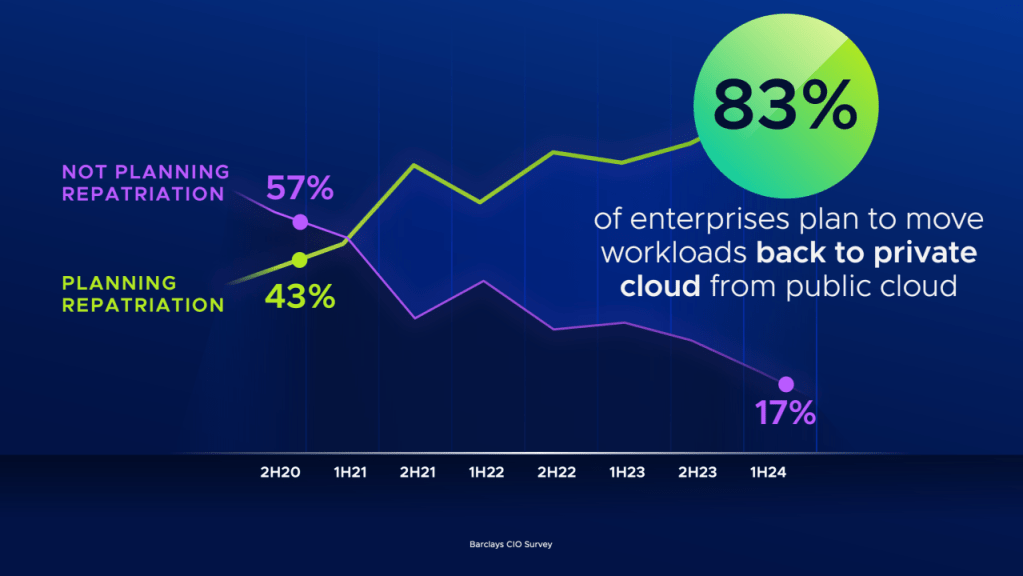
Over the past decade, enterprises have embraced hyperscalers as the default destination for workloads. The promise of infinite scalability, cost savings, and simplified operations lured companies into large-scale cloud migrations. Yet, as the dust has settled, many organizations are discovering that the cloud is not always the most efficient, secure, or economical place for every workload.
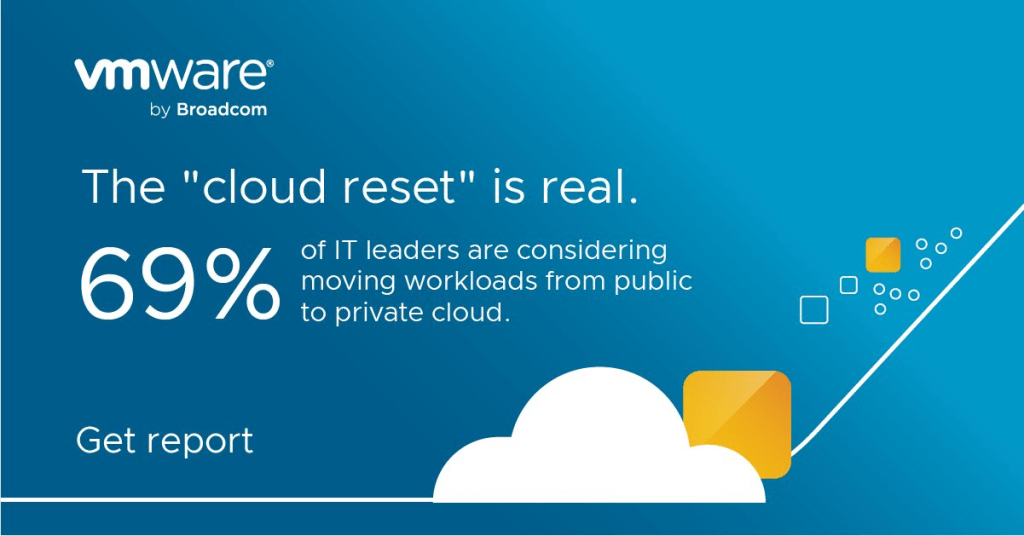
This realization has fueled a growing trend: workload repatriation, the process of moving workloads from the cloud back to on-premises environments. Far from being a retreat from innovation, this trend signals digital maturity. Companies are redefining their IT strategies, aiming for a balanced hybrid model that takes advantage of both cloud and on-premises strengths.

Why Repatriation Is on the Rise
Cloud adoption brought undeniable benefits: agility, global scalability, and the ability to experiment without heavy upfront investments. But as cloud bills soared, latency issues emerged, and sovereignty concerns mounted, IT leaders began to question whether some workloads truly belonged in hyperscaler environments.
Workload repatriation is not about rejecting the cloud but about right-sizing infrastructure. It’s about locating workloads where they deliver the highest business value. For many organizations, that means shifting some functions back to data centers they own and operate.

Cost Optimization: The Biggest Driver
One of the strongest arguments for repatriation is cost. Hyperscalers thrive on a flexible, consumption-based model, which can initially look attractive. However, unpredictable usage patterns and hidden expenses (such as data egress fees) often lead to spiraling bills.
In contrast, on-premises infrastructure offers:
- Predictable costs with upfront capital expenditure followed by consistent operational expenses.
- Lower long-term TCO for stable, predictable workloads.
- Leverage of existing assets such as hardware and software licenses, turning sunk costs into ongoing value.
For example, large-scale analytics, high-volume storage, and steady workloads often prove cheaper on-premises than in the cloud over time.
Better Performance and Reduced Latency
Performance is another area where on-premises can outshine hyperscalers. When workloads depend heavily on low latency—such as financial trading, supply chain optimization, or real-time data processing—the cloud introduces unavoidable delays. Cloud servers, no matter how powerful, are still hosted in shared and often distant environments that introduce variability.
By bringing those workloads back on-premises, organizations benefit from:
- Sub-millisecond latency for critical applications running close to users.
- Stable performance free from the “noisy neighbor” effect in multi-tenant cloud infrastructure.
- Faster processing for compute-intensive workloads such as AI training, rendering, or advanced simulations.
Greater Control and Data Sovereignty
In an era of increasing security threats and tightening compliance regulations, control is paramount. Keeping sensitive data on-premises allows organizations to design robust, customized security measures aligned with their risk posture.
The advantages include:
- Data residency compliance, meeting local and regional requirements.
- Granular control over infrastructure with no reliance on provider-managed parameters.
- Reduced security risks, as workloads are less exposed to shared environments.
For industries such as healthcare, finance, and government, these benefits are not optional—they’re mandatory.
Hybrid Flexibility Without Lock-In
Workload repatriation does not mean abandoning the cloud altogether. Instead, it allows enterprises to craft thoughtful hybrid architectures. In such models, stable and critical workloads remain on-premises, while cloud resources handle elastic, burstable, or globally distributed workloads.
This hybrid approach enables enterprises to:
- Avoid vendor lock-in, reducing dependency on a single provider’s ecosystem.
- Adopt multi-cloud strategies, placing the right workloads in the right environments.
- Build resilience, ensuring that operations continue even if one platform experiences disruption.
When executed well, this flexibility creates an IT environment that is more adaptable to both market needs and regulatory changes.

Sustainability and Energy Efficiency
Sustainability has become a strategic priority for many organizations, and workload placement plays a role in meeting environmental goals. Hyperscalers are vocal about their renewable energy commitments, but on-premises operations can rival or even beat them when carefully designed.
Organizations running workloads locally can:
- Optimize hardware use based on actual demand, avoiding wasteful overprovisioning.
- Power data centers with local renewable sources or efficient cooling systems.
- Extend hardware lifespan and implement responsible recycling practices.
In this way, repatriation can align with both financial and environmental objectives.
Comparative Metrics: Cloud vs. On-Premises
| Metric | On-Premises | Hyperscalers (Public Cloud) |
|---|---|---|
| Total Cost of Ownership (TCO) | Upfront CapEx; predictable and stable OpEx | Lower entry costs but spiking long-term OpEx |
| Latency | Sub-millisecond for local workloads | Typically 20–100ms depending on network distance |
| Performance Consistency | Stable throughput with dedicated infrastructure | Possible variations due to shared resources |
| Scalability | Limited to existing infrastructure capacity | Virtually limitless on-demand scaling |
| Data Sovereignty | Complete control; local jurisdiction | Dependent on hyperscaler’s data center policies |
| Sustainability | Tailored local solutions; efficient capacity use | Renewable investments but less user control |
| Vendor Dependency | Flexibility in hardware/software choices | High risk of vendor lock-in and egress costs |
A Sign of Digital Maturity
For many companies, the initial migration to the cloud was an experiment in agility. Today, workload repatriation reflects a deeper understanding of how to align IT infrastructure with business strategy. This shift indicates maturity: enterprises now have the experience and tools to evaluate workloads individually, placing them where they make the most sense.
- Agile, unpredictable, globally distributed applications flourish in the cloud.
- Predictable, heavy, and sensitive workloads run more efficiently on-premises.
By embracing repatriation, enterprises transform cloud adoption from a blanket strategy into a nuanced one, tailored to maximize value.

Conclusion
Workload repatriation is more than a cost-cutting exercise—it is a strategic evolution. By moving select workloads back on-premises, businesses gain control, predictability, and security, without losing the flexibility that made the cloud attractive in the first place.
The future of IT infrastructure is not exclusively cloud or on-premises. It is hybrid by design, where organizations dynamically place workloads where they perform best, aligning technology with both business goals and regulatory realities. Repatriation is not a retreat; it is a recalibration—one that mature organizations are embracing to achieve smarter, more resilient, and more cost-effective infrastructures.
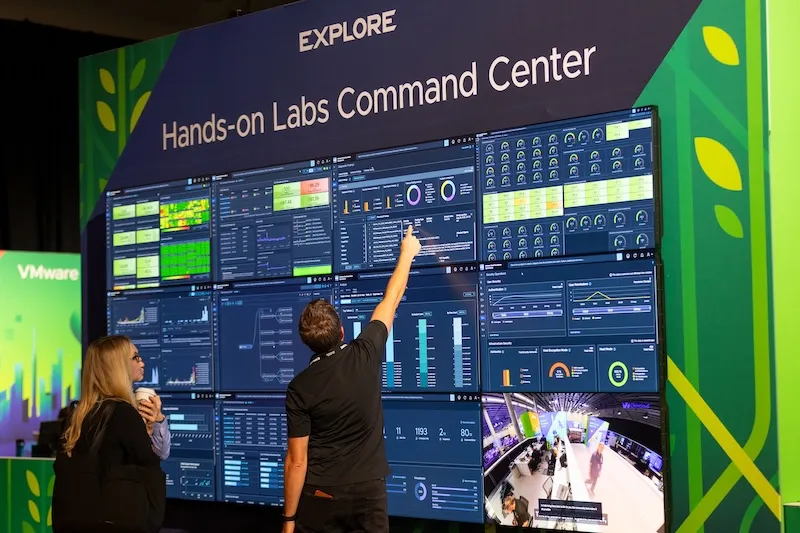
Highlights and Innovations from VMware Explore 2025

VMware Explore 2025 focused on unveiling the transformation of VMware Cloud Foundation (VCF) 9.0 as a unified, private cloud platform natively designed for artificial intelligence (AI), alongside major updates in security, cloud operations, and strategic partnerships.

Major Announcements
- VMware Cloud Foundation 9.0: Introduced as the first truly unified private platform, with native AI integration and streamlined operations.
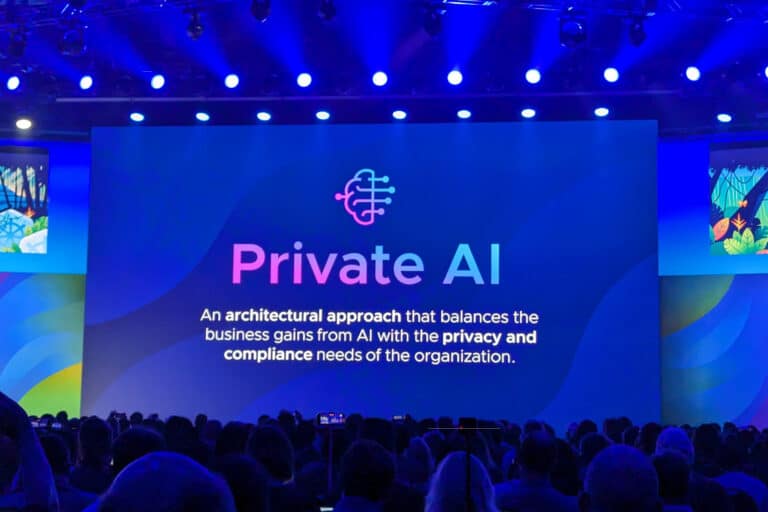
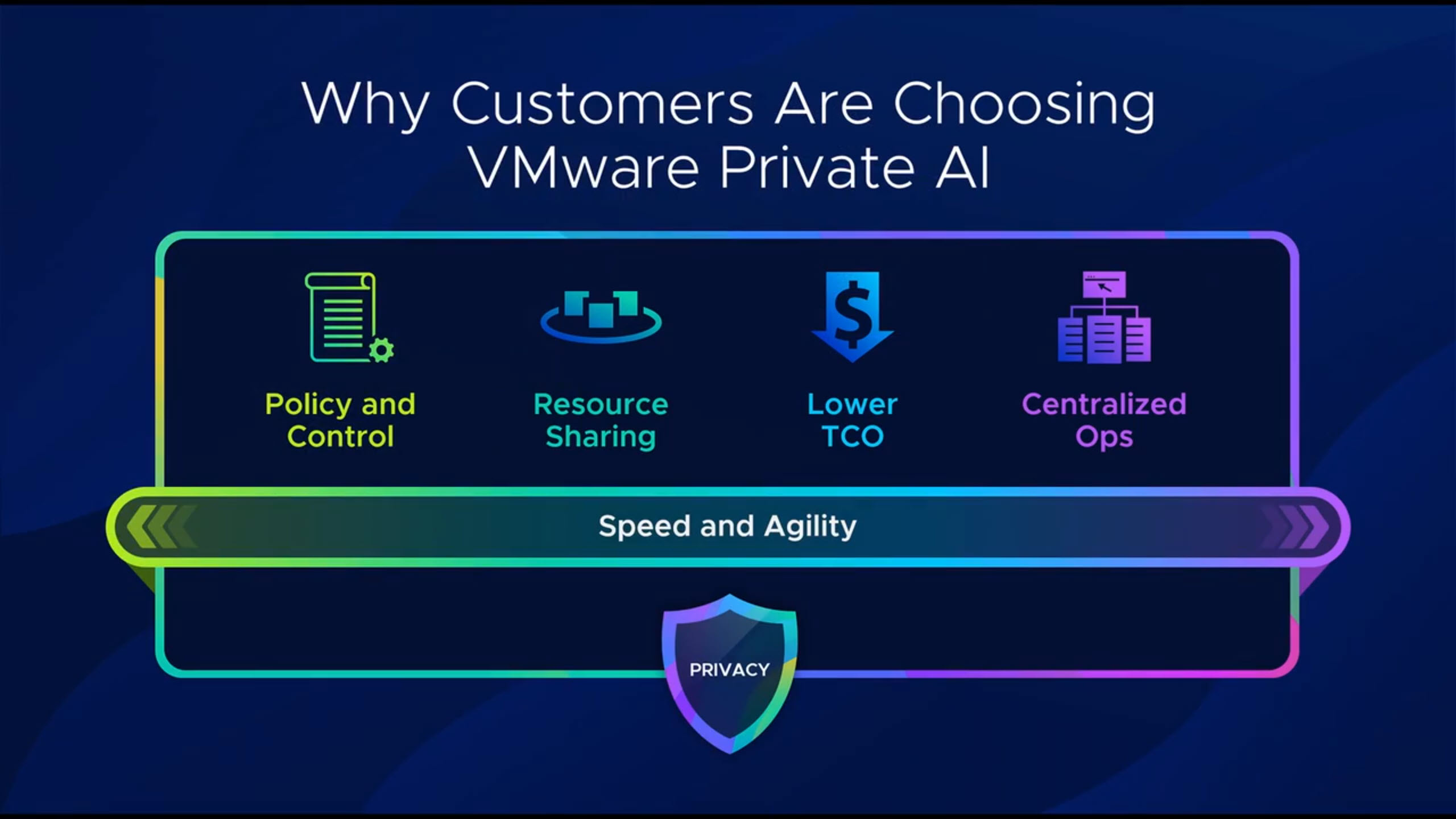
- Private AI Services: VMware Private AI Services are now standard in VCF 9.0, making secure, scalable AI adoption easy and supporting accelerators like AMD and NVIDIA GPUs.
- Cybersecurity Advances: New features such as Advanced Cyber Compliance, large-scale malware detection, secure container images, and confidential computing were showcased.
- Broadcom–Canonical Partnership: Announced enterprise support for Canonical to strengthen secure and updated container environments and optimize AI data processing.
Event Experience
- Over 400 expert-led sessions, hands-on labs, and panels focused on cloud infrastructure, modern apps, innovation, and networking/security.
- New registration options, more personalized access, and an expanded offering of certifications and technical experiences.
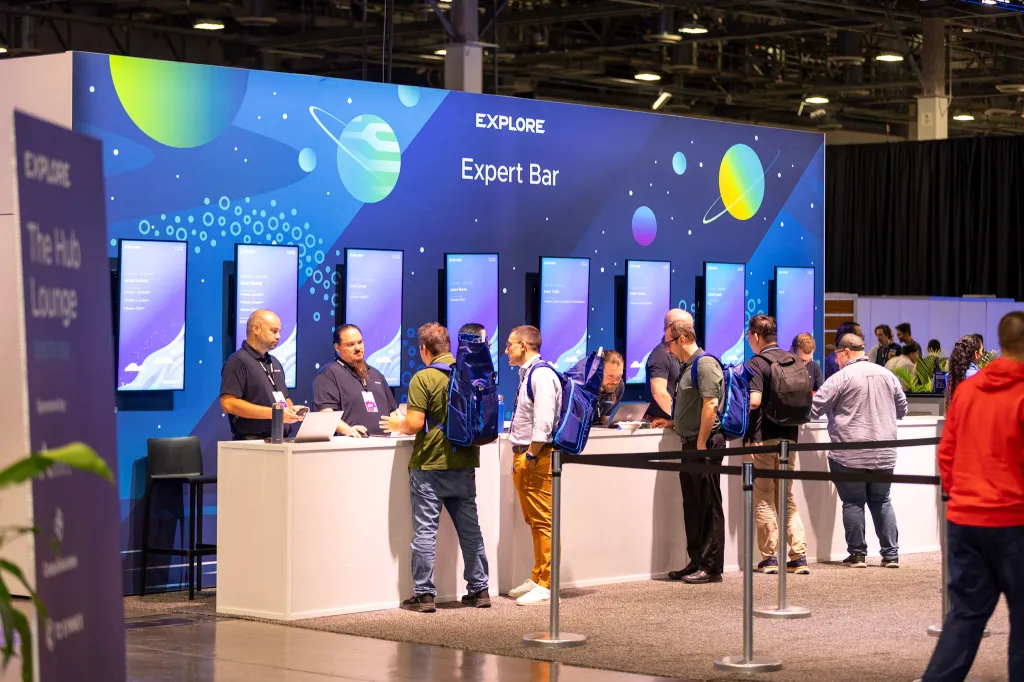
- “The Hub” served as the event’s central networking space for demos, breakout sessions, and community activities, open to all attendees.
- The general session, “Shaping the Future of Private Cloud and AI Innovation,” featured leaders from Broadcom and VMware discussing trends, customer cases, and the future for cloud sovereignty, AI, and simplified subscription models.
Key Focus Areas
- Infrastructure Modernization: Emphasis on simplification, operational efficiency, and cost control.
- Professional Growth: Certifications, networking, and expanded resources for developers and cloud administrators.
- AI and Cloud Innovation: New technologies and strategic partnerships with industry leaders like AWS, Google Cloud, Dell, Intel, and more.

VMware Explore 2025 established VCF 9.0 as the core of modern private infrastructure, enabling accelerated AI adoption, advanced security, and a thriving enterprise ecosystem.
Modernizing Private Cloud: VMware Cloud Foundation and vSphere 9.0 Unleash Simplicity, Security, and AI Performance

The latest release of VMware Cloud Foundation and vSphere 9.0 marks a significant leap for private cloud innovation, promising to simplify, secure, and scale IT infrastructure while supporting the changing needs of modern businesses. Packed with advanced features, this version addresses persistent challenges in virtualization, AI adoption, and mission-critical workload management, making it a versatile choice for today’s IT leaders.

Unified and Simplified Management
VMware’s new approach consolidates infrastructure management by integrating compute, storage, and networking into a unified platform. This redesign not only streamlines day-to-day operations through fleet-wide visibility but also introduces a simplified licensing model; customers now receive a single license file encompassing all core components, eliminating the confusion and administrative overhead of tracking multiple product keys across vCenters and clusters.
Versioning and Lifecycle Improvements
The shift to straightforward version numbering reduces confusion and speeds up upgrades. Lifecycle management has been optimized, with new features like live patching allowing for host upgrades with minimal downtime. Configuration profiles and global image management further enhance consistency and control, enabling scalable, policy-driven administration—even in clusters with mixed vendor hardware.
Versioning and Lifecycle Improvements
The shift to straightforward version numbering reduces confusion and speeds up upgrades. Lifecycle management has been optimized, with new features like live patching allowing for host upgrades with minimal downtime. Configuration profiles and global image management further enhance consistency and control, enabling scalable, policy-driven administration—even in clusters with mixed vendor hardware.

Resource Management Innovations
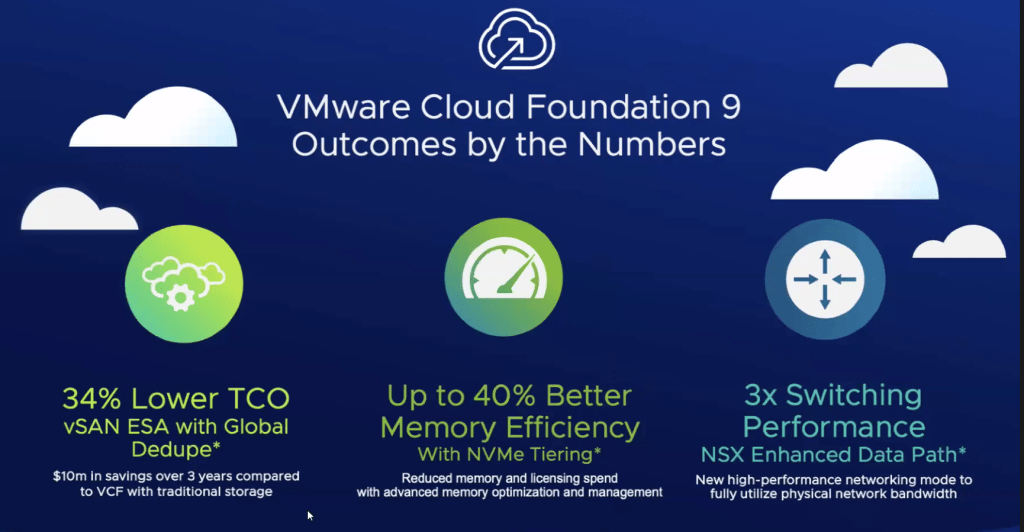
A highlight of this release is NVMe Memory Tiering, which dramatically increases memory resources without expensive hardware investments. By leveraging lower-cost NVMe devices as memory, organizations can double or even quadruple host memory capacity, boosting the number of VMs supported per server and maximizing utilization. This translates to lower total cost of ownership, reduced energy needs, and better resource scaling for workloads that previously faced memory constraints.

Performance and AI Capabilities
vSphere 9.0 delivers breakthrough enhancements for AI and machine learning workloads. Zero-downtime vGPU vMotion allows for rapid, interruption-free migration of graphics-enabled VMs; recent improvements have cut downtime from over 40 seconds to just 2 seconds for large GPU profiles. The platform now offers full visibility into GPU resources for easy planning and cluster optimization. Intelligent placement and automated shuffling ensure clusters accommodate even sprawling GPU workloads efficiently, streamlining expansion for AI-driven operations.
Modern Workload and Kubernetes Support
Recognizing the shift toward containers and microservices, vSphere’s Kubernetes integration now provides modular, simple enablement—eliminating the need for complex load balancers and multiple control planes. Both VM-based and container workloads are natively managed with enhanced self-service options, facilitating modern application deployment while maintaining compatibility with legacy systems. Over half of organizational workloads remain VM-based, so these upgrades ensure seamless operation and future-ready expansion.
Security and Compliance at the Core
Security is no longer an afterthought. VMware embeds encryption, federated authentication, and compliance monitoring throughout the platform. Features such as drift detection, remediation, and advanced access control guarantee that even as user expectations and regulatory requirements evolve, environments stay secure and compliant. Integration across management domains allows rapid response to threats and simplifies prove-out for audit teams.

VMware Cloud Foundation and vSphere 9.0 set a new standard for private cloud infrastructure. By unifying management, unlocking scalability, and prioritizing security, this release puts enterprises firmly on the path to modern application architectures and AI adoption—without leaving legacy workloads behind. For enterprise IT, the journey to digital transformation just got a whole lot faster, simpler, and more secure.
VMware Cloud Foundation 9: A Deep Dive into Core Innovations
VMware Cloud Foundation 9 (VCF 9) represents a significant leap forward in private cloud infrastructure, offering a unified platform designed to simplify deployment, operations, and the developer experience. This latest release integrates compute, storage, networking, automation, and operations into a single, cohesive product, realizing the long-standing vision for the VCF product.

Key Highlights of VCF 9:
- Unified User Experience: VCF 9 delivers a streamlined experience for building, operating, and securing a modern private cloud across on-premises data centers, in hyperscaler and VMware Cloud Service provider clouds, and at the edge. A new unified interface for cloud administrators offers a holistic view of private cloud operations, while a Quick Start App significantly reduces setup time and complexity.
- Compute Enhancements:
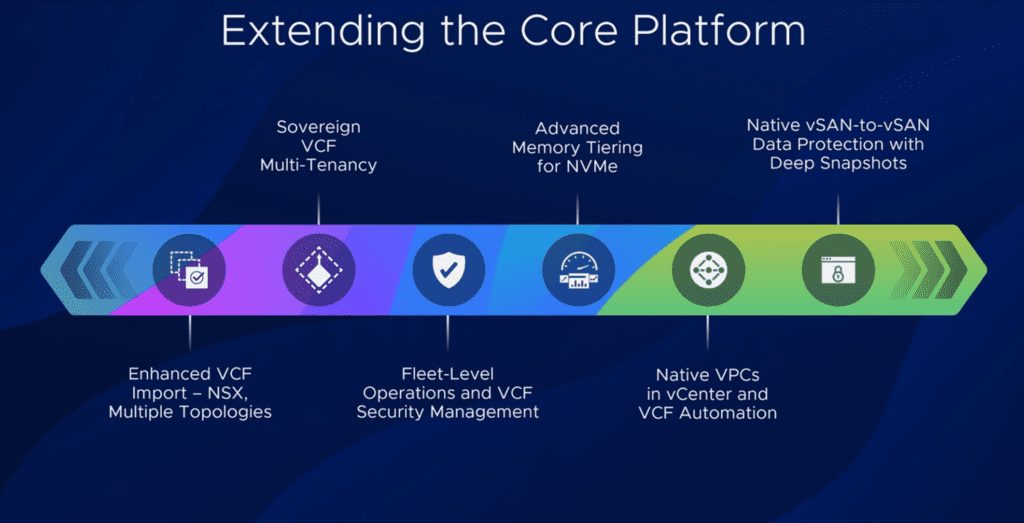
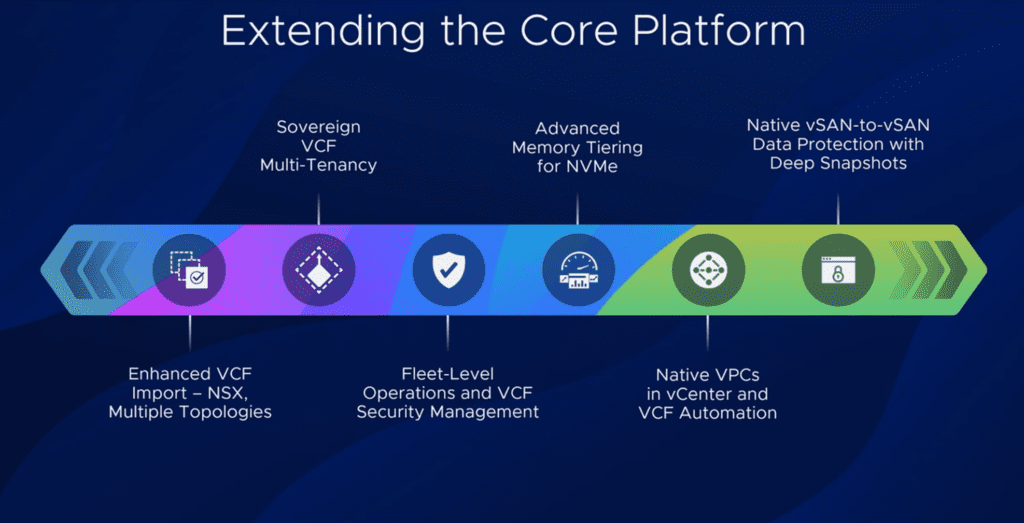
- Advanced Memory Tiering: This innovative feature identifies infrequently used memory blocks and moves them to lower-cost NVMe devices. This software-based solution can reduce total costs by 35-50% by increasing VM density, with minimal performance overhead.
- Confidential Compute: VCF 9 introduces a technology preview that encrypts the runtime environment, including data in memory, providing enhanced end-to-end data security. This is achieved through a partnership with Intel, leveraging their TDX in-memory encryption technology.
- CPU Optimization: Continued enhancements to the core virtualization platform better leverage new generations of CPUs with higher core counts and density.
- Storage Innovations:
- VSAN ESA Global Deduplication: This addresses a previous gap by providing deduplication at a cluster-wide and per-object level, leading to additional cost savings.
- VSAN Native Replication: Building on previous releases, VCF 9 introduces native replication of snapshots to a remote site for disaster protection. This feature is integrated into VSAN workflows, allowing for per-VM replication and independent snapshot retention policies.
- Networking Strategy Shift:
- Virtual Private Cloud (VPC): A major shift bringing VPCs into vCenter, providing isolation domains for VMs. This enables VI administrators to create and manage VPCs through vCenter, integrating with automation layers for provisioning workloads.
- New Data Path/Switch in NSX: A new data path is introduced in NSX and BDS that increases network throughput significantly.

Additional Benefits:
- Improved Performance: VCF 9 delivers near bare-metal performance for virtualized AI/ML workloads, while retaining all virtualization benefits.
- Enhanced Security: Robust data control, compliance, and resilience features empower IT operations amidst regulatory complexities and geopolitical uncertainty.
- Cost Management: VCF Operations empowers users to monitor infrastructure-related costs and associated services or license expenses with greater precision.
VMware Cloud Foundation 9 offers a modern private cloud experience, combining the agility and scalability of public cloud with the security, performance, and cost benefits of an on-premises environment. It’s designed to remove friction between infrastructure and application teams, offering a unified interface for platform and development teams.
VMware Cloud Foundation 9: Simplifying Private Cloud Implementation and Scaling

VMware Cloud Foundation 9 (VCF9) marks a significant advancement in private cloud infrastructure, specifically designed to simplify the deployment and scaling of trusted private clouds. VCF9 empowers organizations to operate private clouds with the efficiency and scale comparable to leading public cloud services.
The Growing Importance of Private Clouds
There’s an increasing emphasis on private clouds, driven by cost considerations associated with running applications across multiple public cloud services. Private clouds offer enhanced control, governance, and compliance, including sovereign cloud capabilities vital for jurisdictional control and regulatory adherence. VMware collaborates with major hyperscalers and a vast network of cloud service providers (CSPs), including numerous certified sovereign cloud providers, to assist organizations in meeting stringent regulatory frameworks.

Key Innovations in VCF9
VCF9 introduces several pivotal innovations:
- GPU as a Service: This capability enables providers to offer sovereign AI services, facilitating the seamless migration of GPU workloads and simplifying the execution of demanding applications like PyTorch inferencing.
- Memory Tiering (vSphere): This innovation is projected to increase virtual machine density by approximately 40%, leading to substantial cost savings.
- VSAN with Enhanced Storage Architecture (ESA): Re-architected with NVMe drives, VSAN delivers predictable latencies under one millisecond, improved resilience through distributed failover, and reduced costs compared to traditional storage arrays.
- Native Virtual Private Clouds (VPCs): VCF9 natively integrates VPCs, allowing users to define virtual boundaries for applications and manage network settings such as firewalls and load balancing directly within the vCenter console.
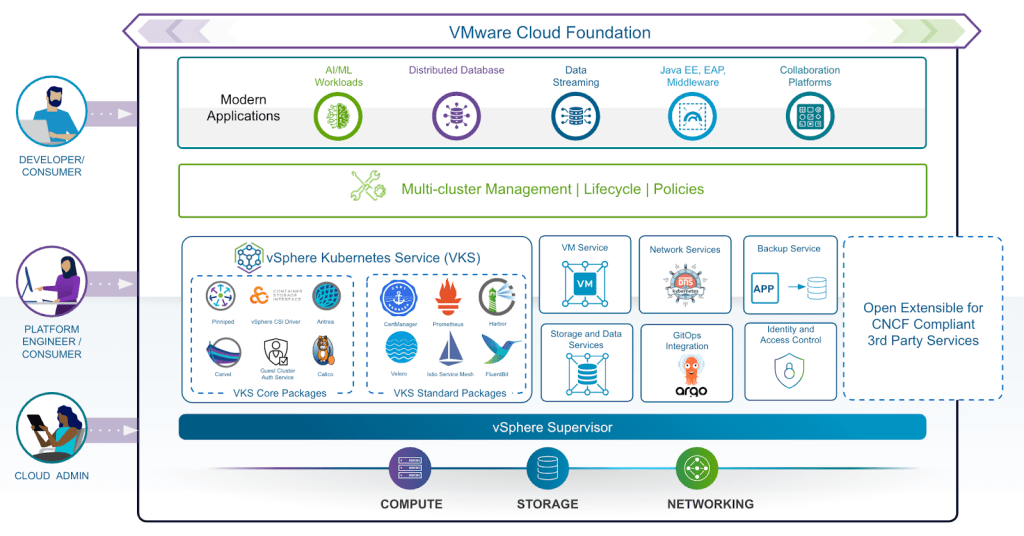
- Native Kubernetes and Container Services: Treating both virtual machines and containers as native elements, VCF9 includes out-of-the-box management for essential Kubernetes services, streamlining the deployment and orchestration of containerized applications.
VCF9 represents a significant evolution, establishing itself not only as a robust platform for virtual machines but also as a leading solution for running and orchestrating containers with Kubernetes. It is engineered to support emerging use cases like AI workloads and to address contemporary security challenges, including ransomware.

Usage Meter 9.0
Broadcom has launched Usage Meter 9.0 and a new management portal. These updates will change how you handle usage reporting and billing.
Here’s a simple guide to what’s new and what you need to do.
Of course. Here is a more reader-friendly version of the blog post.

Big News for VMware Providers: Your Guide to Usage Meter 9.0
Big changes are here for VMware Cloud Service Providers. Broadcom is launching Usage Meter 9.0 and a new management portal. These updates will change how you handle usage reporting and billing.
Here’s a simple guide to what’s new and what you need to do.
Key Changes You Can’t Ignore
1. Metering is Now Online-Only
The biggest change? All usage metering must now be done online. The option for offline reporting is gone. Your Usage Meter tool will now collect and send all data directly to the cloud.
2. How Your Billing Will Work
The billing process is also getting an overhaul.
- The Usage Meter will create hourly reports that determine your bill.
- Important: You must use official Broadcom-generated VCF license keys. Usage from any other keys will not be tracked or billed.
3. A New Home for Management
Say goodbye to the old portal.
- Old Portal:
console.cloud.vmware.com - New Portal:
vcf.broadcom.com
This new Business Services Console is your new hub for managing Usage Meter registrations, reports, and licenses.

What’s New in Usage Meter 9.0?
The latest version comes with two key upgrades:
Expanded Support: It now supports on-demand metering for NSX vFend, giving you more detailed usage data.
Tighter Security: A new OAUTH token is now required for authentication. You will need to set this up manually during the upgrade.

Your Simple To-Do List
To stay compliant and keep things running smoothly, here are your next steps:
✅ Swap Your License Keys: Switch to official Broadcom VCF keys as soon as possible.
✅ Stay Updated: Watch for the official launch announcements for the new portal and Usage Meter 9.0.
✅ Upgrade Within 90 Days: Once it’s released, you have 90 days to upgrade all your Usage Meter instances.
✅ Generate Your OAUTH Key: Don’t forget this manual step during the upgrade process.
✅ Note the License Cap: Be aware that a cap on license keys took effect on May 12th.
By following these steps, you can ensure a smooth transition. These updates are a major step forward, and staying prepared is key to success.