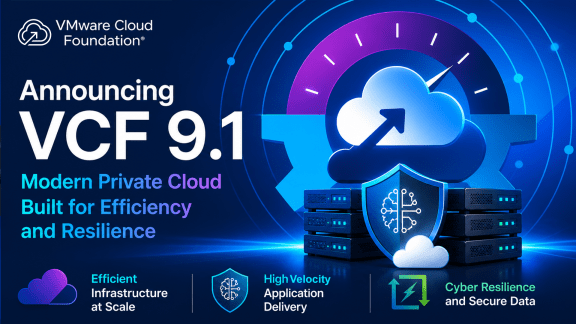
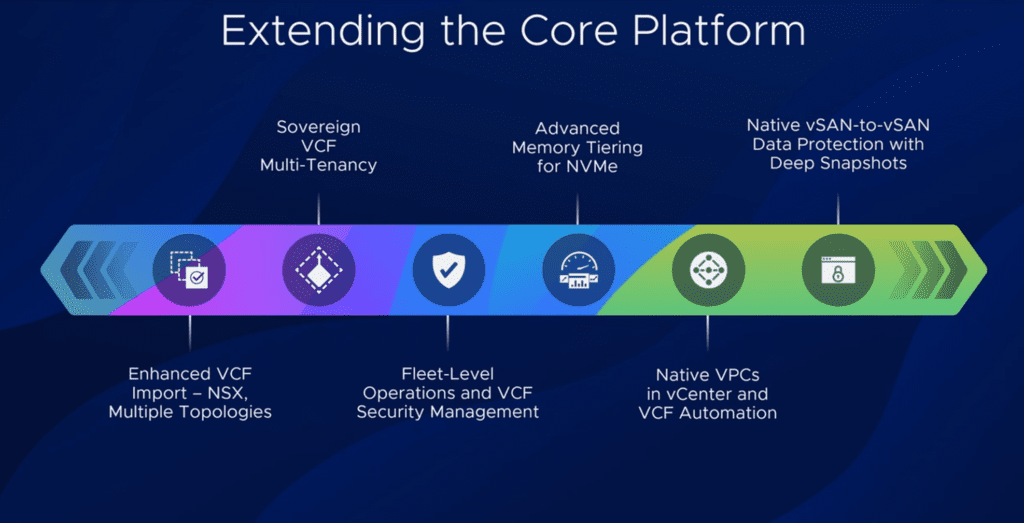
Broadcom has announced an important change to its Site Recovery Manager (SRM) offering. As of November 2, 2026, Live Recovery is now included as part of VMware Cloud Foundation (VCF) and VMware vSphere Foundation (VVF) subscriptions.
This means that SRM is no longer sold as a standalone product. Instead, its capabilities are now integrated into the broader private cloud platform.
Let’s take a look at what has changed and what this means for existing and new customers.
From Standalone Product to Built-in Platform Capability
One of the main changes is the way Broadcom delivers Site Recovery Manager capabilities.
Previously, customers needed a separate SRM entitlement to implement disaster recovery solutions. With this new model, Live Recovery capabilities are included directly in VCF and VVF subscriptions.
This change brings protection, replication and disaster recovery closer to the core platform, making them part of the overall private cloud experience.
For customers already running VCF or VVF, this is an important update because it simplifies the licensing model and removes the need for a separate SRM subscription.
What Has Changed?
Here are the key points:
SRM is no longer sold as a standalone product: The standalone offering has been replaced by Live Recovery as part of the VCF and VVF platforms.
Included in VCF and VVF subscriptions: Live Recovery capabilities are now part of these subscription offerings.
Existing customers are entitled: Customers with active VCF or VVF subscriptions are included.
New and renewed subscriptions: New, renewal and expansion subscriptions automatically include Live Recovery.
In other words, disaster recovery is becoming an integrated capability of the VMware private cloud platform rather than a separate product that customers need to purchase and manage independently.
What Do Existing Customers Need to Do?
For customers who want to use Live Recovery now, Broadcom has provided a straightforward process.
According to the announcement, customers can:
Obtain a term-limited SRM license key from the Broadcom Support Portal.
Upgrade to VCF or VVF 9.1.3 to receive automatic entitlement benefits.
Protect up to 10,000 virtual machines.
It is worth checking the official Broadcom documentation and support portal for the specific entitlement and activation requirements applicable to your environment.
Why Is This Important?
I believe this change is more than just a licensing update.
By including Live Recovery in VCF and VVF, Broadcom is reinforcing its strategy of delivering a more integrated private cloud platform.
Protection, replication, disaster recovery and business continuity are essential parts of any enterprise infrastructure. Bringing these capabilities directly into the platform can simplify adoption and reduce the complexity associated with managing separate product entitlements.
It also makes disaster recovery capabilities more accessible to customers who are already investing in the VCF or VVF ecosystem.
Final Thoughts
This is a positive step in the evolution of the VMware private cloud platform.
Moving from a standalone SRM model to an integrated Live Recovery offering represents a change in both product packaging and platform strategy.
For existing VCF and VVF customers, it is definitely worth reviewing your current environment and understanding how to take advantage of these new entitlements.
As Broadcom continues to evolve VCF and VVF, we can expect more capabilities to become part of a unified platform experience.
One less standalone product to manage, and one more capability built into the platform.
Note: The information in this article is based on Broadcom’s November 2026 announcement. Customers should always refer to the official Broadcom documentation for the latest licensing, entitlement and upgrade requirements.
Kubernetes is now an important part of many modern application platforms. However, running Kubernetes in an enterprise environment is not only about creating a cluster.
You also need networking, storage, authentication, security, observability, backup, scaling and other services around the Kubernetes platform.
This is where vSphere Kubernetes Service (VKS) and its package model become interesting.
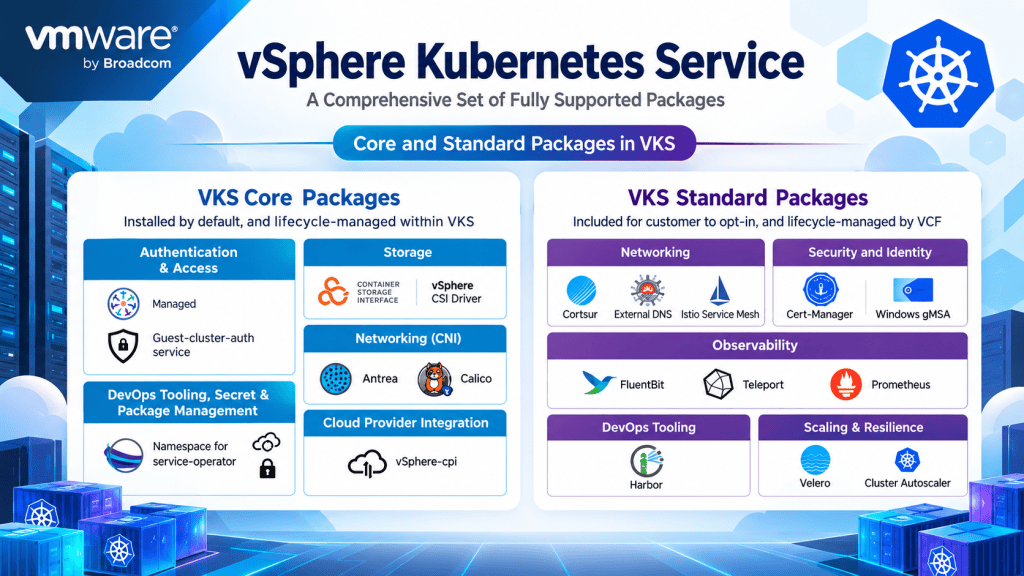
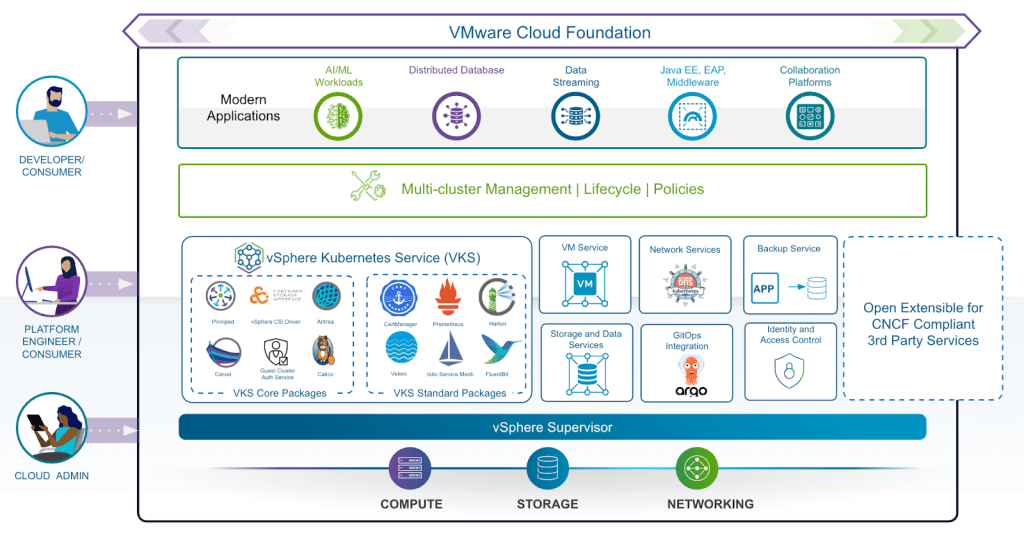
VKS provides a set of packages that extend the Kubernetes platform running on VMware Cloud Foundation (VCF). These packages are divided into two main groups:
Core Packages
Standard Packages
Understanding the difference between these two groups is important when designing and operating Kubernetes environments on VCF.
Core Packages: The Foundation
Core Packages are the components that provide the fundamental functionality required by a VKS cluster.
They are installed by default, bundled with the vSphere Kubernetes Release (VKr), and lifecycle-managed as part of the Kubernetes platform. They are also fully runtime-supported.
The main Core Packages cover authentication, storage, networking, cloud provider integration, and package and secret management.
Authentication and Access
VKS includes components such as Pinniped and the guest-cluster-auth-service.
Pinniped provides authentication integration with external identity providers, while the authentication service provides the mechanisms required to authenticate users accessing the Kubernetes environment.
This means authentication is integrated into the platform instead of being something that administrators need to build separately for every cluster.
Storage
The vSphere CSI Driver provides the integration between Kubernetes and vSphere storage.
This allows Kubernetes workloads to use persistent volumes backed by vSphere storage such as vSAN and VMFS.
For stateful applications, this integration is particularly important because applications can request persistent storage using standard Kubernetes mechanisms.
Networking
VKS supports Kubernetes networking through CNI implementations such as Antrea and Calico.
These components provide pod networking and network policy capabilities.
Antrea is also required when using Istio Service Mesh in VKS.
Cloud Provider Integration
The vSphere Cloud Provider Interface (CPI) provides integration between Kubernetes and the underlying vSphere infrastructure.
Among other capabilities, it provides infrastructure information to Kubernetes nodes and supports functionality such as load balancer provisioning.
Package and Secret Management
VKS also includes components such as kapp-controller and secretgen-controller.
These provide capabilities for managing packages and secrets in a declarative way.
Together, these Core Packages provide the basic building blocks that allow Kubernetes to operate as an integrated part of the VCF platform.
Standard Packages: Extending VKS
Core Packages provide the foundation, but not every Kubernetes environment has the same requirements.
This is where Standard Packages come in.
Standard Packages are optional packages that administrators can deploy depending on their operational requirements.
They cover areas such as:
Networking
Security and identity
Observability
DevOps
Scaling
Resilience
Unlike Core Packages, Standard Packages have an independent release lifecycle and are managed separately from the Kubernetes upgrade process. Broadcom provides installation and upgrade support, with runtime support available for selected packages such as Istio.
Networking
Contour
Contour is an Envoy-based ingress controller.
It can be used to manage HTTP and HTTPS traffic entering Kubernetes applications.
ExternalDNS
ExternalDNS automates DNS record management for Kubernetes services and ingresses.
This can reduce the amount of manual DNS configuration required when applications are deployed or changed.
Istio Service Mesh
Istio provides service mesh capabilities for Kubernetes applications.
It can provide:
Secure service-to-service communication
Mutual TLS (mTLS)
Traffic management
Load balancing
Observability
Policy capabilities
Istio was introduced as a VKS Standard Package with VKS 3.4, with runtime support beyond the installation and upgrade support normally provided for Standard Packages.
Security and Identity
Cert-Manager
Cert-Manager automates the provisioning and renewal of TLS certificates.
This is useful for applications and services that need certificates without requiring administrators to manage the complete certificate lifecycle manually.
Windows gMSA
Windows Group Managed Service Accounts (gMSA) allow Windows containers running in Kubernetes to use Active Directory service accounts.
This is particularly useful in environments where Windows and Linux workloads need to run on the same Kubernetes platform.
Observability
Running Kubernetes in production requires good visibility into the environment.
VKS Standard Packages include several components that can help with this.
Fluent Bit
Fluent Bit is used to collect, process and forward container logs.
Telegraf
Telegraf is a plugin-based agent that can collect and forward metrics.
Prometheus and Alertmanager
Prometheus provides a time-series monitoring database, while Alertmanager provides alerting capabilities.
Together, these components can provide the monitoring foundation required for Kubernetes workloads and infrastructure.
DevOps Tooling
Harbor
Harbor provides a container registry for storing and managing container images.
It also provides capabilities such as vulnerability scanning and image signing.
For organizations running multiple Kubernetes clusters, having a controlled container registry can be an important part of the overall software supply chain.
caling and Resilience
Kubernetes environments also need to handle changing workloads and recover from failures.
VKS includes Standard Packages for both of these requirements.
Cluster Autoscaler
Cluster Autoscaler can automatically adjust Kubernetes node pools based on workload requirements.
When additional capacity is required, nodes can be added. When capacity is no longer needed, nodes can be removed.
Velero
Velero provides backup and recovery capabilities for Kubernetes resources and persistent volumes.
This can be used as part of a broader backup and disaster recovery strategy for Kubernetes workloads.
Why the Difference Between Core and Standard Matters
At first, the distinction between Core and Standard Packages might look like a simple categorization.
There is actually an important operational difference.
Core Packages are tightly connected to the VKr lifecycle. They are bundled with the Kubernetes release and are lifecycle-managed as part of the platform.
Standard Packages, on the other hand, can evolve independently.
This gives administrators more flexibility. A package such as Prometheus, Harbor or Velero does not necessarily need to wait for the next Kubernetes cluster upgrade before receiving a new package release.
At the same time, the packages are validated for compatibility with the supported VKr versions.
This is particularly useful because Kubernetes environments can quickly become complex when administrators have to manage compatibility between many different open-source components.
A Simple Comparison
Core Packages
Standard Packages
Deployment
Installed by default
Optional
Lifecycle
Managed with VKr
Independent lifecycle
Version alignment
Bundled with VKr
Validated against VKr versions
Runtime support
Full runtime support
Installation & upgrade support; selected packages have runtime support
Networking
Antrea / Calico
Contour / ExternalDNS / Istio
Storage
vSphere CSI
—
Authentication
Pinniped / Auth Service
—
Security
—
Cert-Manager / Windows gMSA
Observability
—
Fluent Bit / Telegraf / Prometheus
Container Registry
—
Harbor
Backup
—
Velero
Scaling
—
Cluster Autoscale
The Bigger Picture
One of the main benefits of this model is that Kubernetes does not have to be treated as a completely separate platform from the infrastructure underneath it.
VKS brings Kubernetes into the VCF environment while providing integrations for infrastructure services such as compute, storage and networking.
The Core Packages provide the foundation required for the cluster to operate.
Standard Packages then add capabilities that many production environments need, such as ingress, service mesh, monitoring, certificate management, container registries, backup and autoscaling.
Each layer provides a different part of the overall platform.
Final Thoughts
For me, the important thing to understand about VKS is not simply the list of packages.
It is how the packages are managed.
Core Packages are part of the VKS foundation and follow the VKr lifecycle. Standard Packages provide additional capabilities while giving administrators more flexibility around when and how those components are consumed.
This separation makes it easier to understand what is fundamental to the Kubernetes platform and what can be added based on the requirements of a particular environment.
For organizations already using VMware Cloud Foundation, VKS provides a way to run Kubernetes while keeping the Kubernetes platform closely integrated with the existing infrastructure and management
VMware Cloud Foundation 9.1 brings a more structured way to think about private cloud design. For me, the main point is not only about features, but about how to plan the platform in a clean and scalable way.
When working with this kind of environment, the first thing is always architecture. If the layout is not well defined from the start, then later the operations become more difficult, especially when the platform starts to grow.
Main design focus
Area
What matters
Why it is important
Fleet architecture
Organizing domains and management layers
Helps keep the platform easier to operate
Latency
Placement of components across sites
Avoids performance and control issues
Sizing
Planning capacity for compute and management
Prevents early bottlenecks
Scale
Growth of workloads and operations
Makes the design future-ready
Operations
Lifecycle and management model
Reduces day-to-day complexity
A good VCF design should not be based only on the current need. It should also consider how the environment may grow in the next months or years. That is where planning becomes more important than simple deployment.
Design principles
Principle
Practical meaning
Start simple
Keep the first design clean and manageable
Think long term
Do not design only for today
Respect latency
Put systems where they can work properly
Size before build
Estimate capacity before implementation
Plan for operations
Design with administration in mind
In many projects, people focus too much on installation and not enough on design. But the real value is in how the system behaves after it is running. If the design is weak, the operations team will feel it very quickly.
Scale and operations
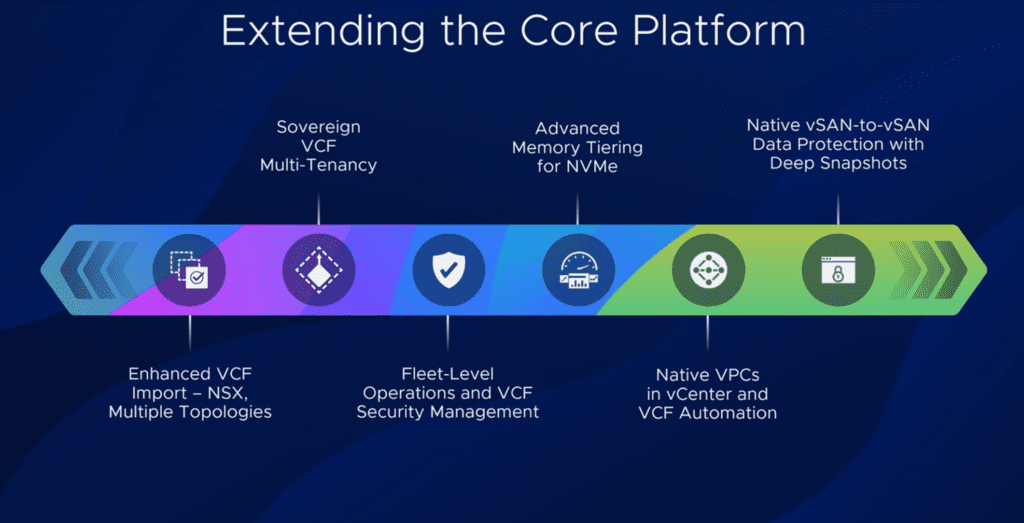
VCF 9.1 seems to push more toward operational maturity. That means the platform is not just a product to install, but a private cloud foundation that needs consistent management and clear structure.
The move toward more centralized operations is useful because it reduces confusion between tools and responsibilities. In real environments, this helps teams work with less friction and better visibility.
What I find useful
Topic
My opinion
Architecture
It is the base of everything
Sizing
Often underestimated
Latency
Very important and sometimes ignored
Operations
Must be part of the design from day one
Scale
Should be planned, not improvised
From a practical point of view, the strongest message is that private cloud design needs discipline. Good design is not only about technology, but about making the environment easier to run, easier to expand, and easier to support.
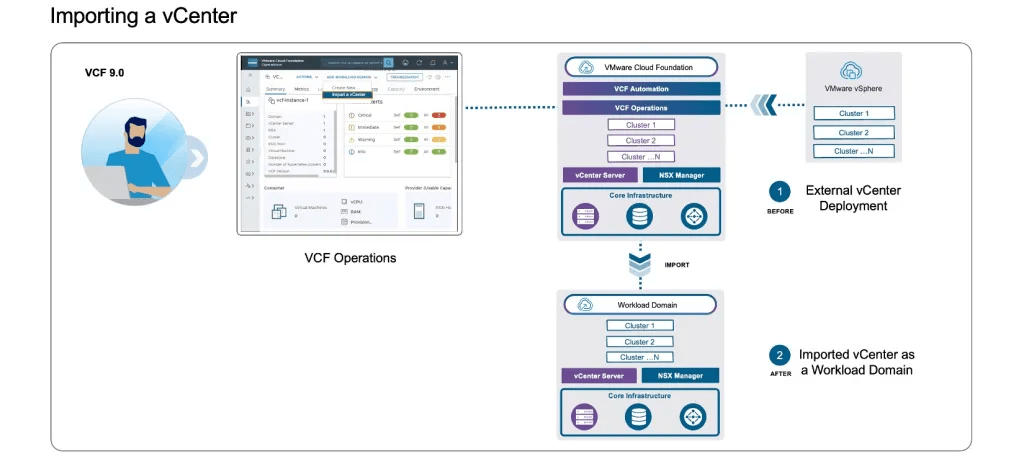
Converting a traditional VMware vSphere environment into a fully automated private cloud using VMware Cloud Foundation (VCF) 9.0 is no longer a “wipe and reinstall” process. With the latest release, you can bring existing infrastructure into the VCF lifecycle via Converge and Import workflows.
This guide outlines the technical requirements and the operational steps to transition your environment to a VCF 9.0 Fleet.
Architectural Approaches
There are two primary methods to transition existing vSphere assets into VCF 9.0:
Feature
Converge (Convert)
Import
Primary Goal
Transforms a standalone vCenter into the Management Domain.
Adds a standalone vCenter as a new Workload Domain.
Target State
Establishes the first VCF Instance/Fleet.
Expands an existing VCF Instance.
Control Plane
Deploys SDDC Manager, NSX, and VCF Operations.
Connects to existing SDDC Manager.
Requirement
Highly strict; requires specific vCenter/ESXi versions.
More flexible; allows for post-import remediation.
Phase 1: Pre-Transition Remediation
Before triggering the conversion, the target vSphere environment must meet specific “VCF-Ready” standards. Failure to remediate these items will cause the automated validation pre-checks to fail.
vCenter Server: Must be upgraded to version 9.0. VCF 9.0 supports the Reduced Downtime Upgrade method to minimize impact during this phase.
Lifecycle Management: Legacy “Baselines” are deprecated. Clusters must be transitioned to vSphere Lifecycle Manager (vLCM) Images.
Networking: While standard switches are supported in some cases, the use of vSphere Distributed Switches (vDS) is highly recommended for NSX integration.
Services: SSH must be enabled on the vCenter appliance, and vSphere DRS must be active and set to Fully Automated to facilitate host evacuation during updates.
Phase 2: The Conversion Workflow (Management Domain)
The Converge process is handled via the VCF Installer. This tool performs an assessment of the existing vCenter and “wraps” VCF management constructs around it.
Deployment Type: Select “New Fleet” and toggle the option for “Existing Environment.”
Inventory Assessment: Provide vCenter and ESXi credentials. The installer will scan the cluster for compliance.
Validation Engine: The installer runs a deep-dive validation. If errors are found (e.g., incorrect VMkernel settings or unsupported DVS versions), they must be remediated in vCenter before clicking “Rerun Validations.”
Component Injection: Once validated, the installer automates the deployment of:
SDDC Manager: The centralized orchestration engine.
NSX Manager: (If not already present) to handle overlay networking.
VCF Operations: To manage licensing and fleet-wide monitoring.
Phase 3: The Import Workflow (Workload Domains)
If you already have a VCF 9.0 Fleet and wish to bring a secondary vCenter under its control, use the Import function within the VCF Operations console.
NSX Integration: During the import, you can specify an existing NSX instance to be shared or deploy a new dedicated NSX manager for that domain.
Validation: Similar to the Converge process, the Import wizard will generate a validation report. This report highlights specific host-level or networking-level configuration drifts that need alignment with VCF standards.
Finalization: Upon success, the vCenter is registered as a Managed Workload Domain, enabling SDDC Manager to handle its future patching and lifecycle tasks.
Key Technical Considerations
Storage Flexibility: VCF 9.0 has expanded support for principal storage. While vSAN remains the standard, you can now utilize NFS or Fiber Channel as principal storage for both Management and Workload domains in certain conversion scenarios.
Workload Continuity: Because the process utilizes DRS and vLCM, VM workloads remain online during host remediation. The only brief interruption occurs during the vCenter switchover (if upgrading versions), which can be timed within a maintenance window.
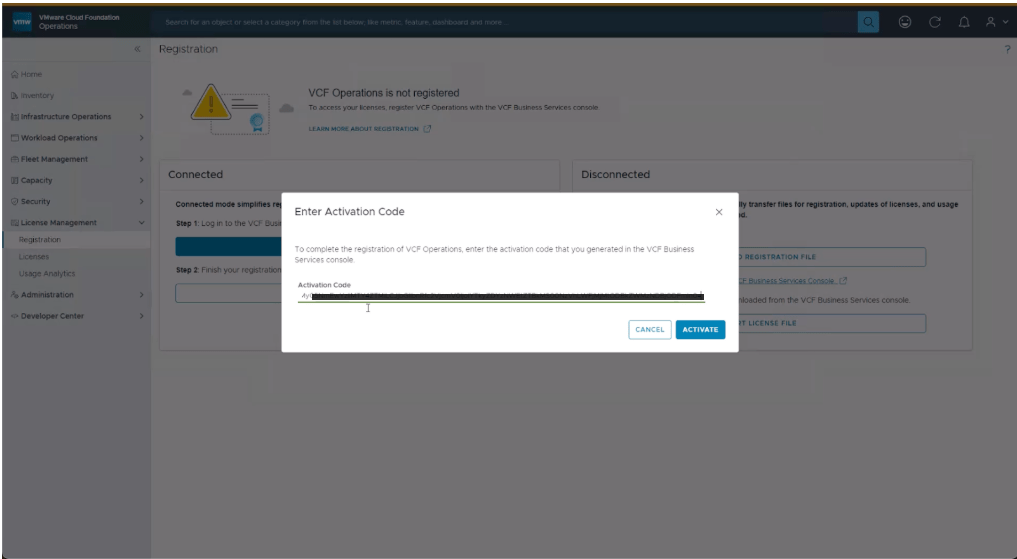
Licensing: Post-conversion, all licensing is centralized through VCF Operations. Ensure you have your VCF 9.0 keys ready to apply to the newly converted fleet.
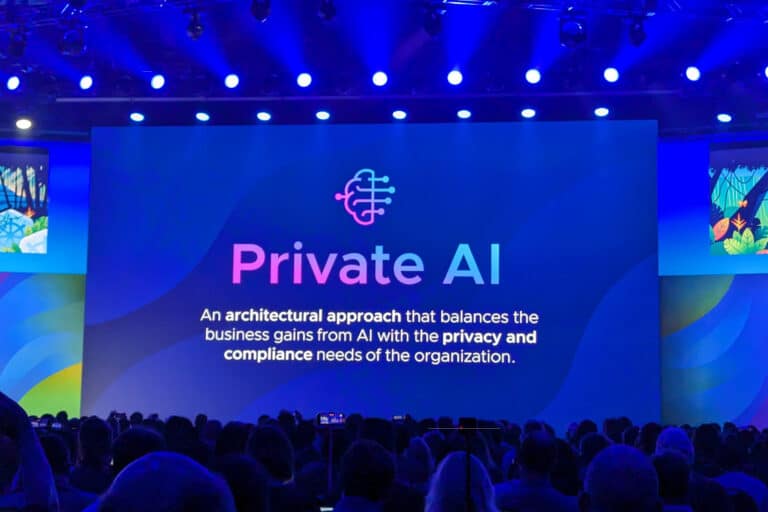
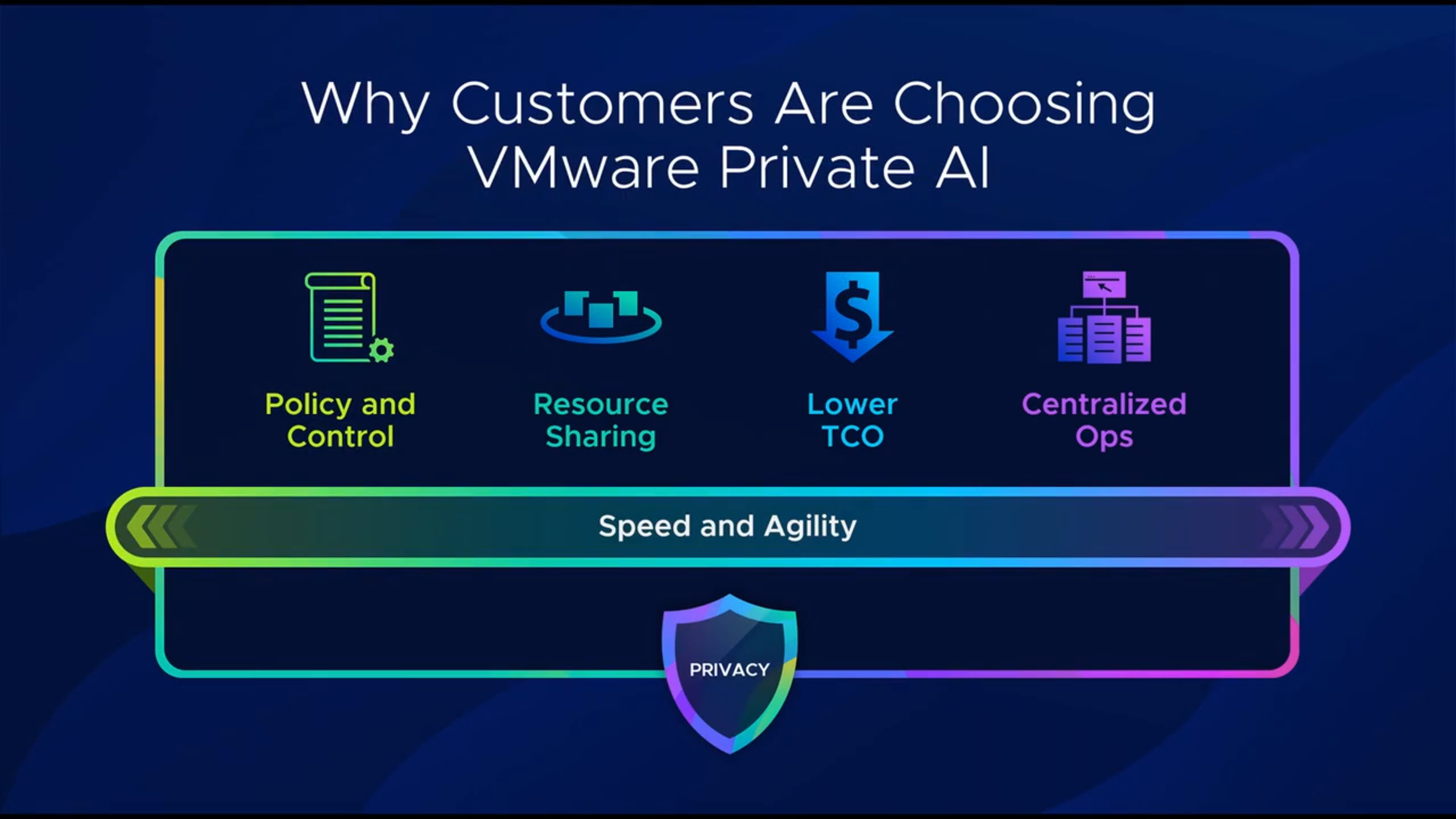
VMware Private AI is bringing generative AI much closer to traditional datacenter teams. What I like is how it runs fully on-premises on top of VMware Cloud Foundation (VCF), so you can keep control of performance, security and, especially, your private data while still giving data scientists and developers a modern AI platform.
What is VMware Private AI
VMware Private AI is an architectural approach to run GenAI workloads on your own private cloud. The idea is to use VCF as the infrastructure layer, VMware Private AI services as the AI platform layer, and NVIDIA AI Enterprise as the model and GPU layer. This combination lets you fine‑tune LLMs, run RAG applications and deploy AI services without sending your sensitive data to a public cloud.
A key point is data privacy: your internal data and intellectual property stay inside your datacenter while you use it to train, fine‑tune or enrich models. At the same time, AI workloads share infrastructure with your “normal” workloads, which makes the platform more efficient from cost and operations point of view.
The platform layers
At the bottom, VMware Cloud Foundation provides the software‑defined compute, storage, networking and security. It gives you standardized workload domains, lifecycle management and consistent operations across environments.
On top of that, VMware Private AI services simplify how you deploy and manage GenAI workloads. You can pull models from external sources like Hugging Face or NVIDIA GPU Cloud, store them in an internal registry (for example Harbor), and then expose them as model endpoints using the model runtime service. There are also data indexing and retrieval services that let you build a vector database with your private knowledge, and an agent builder service to create RAG-style applications that combine models plus your own data.
On the top layer you have NVIDIA AI Enterprise, which brings things like NIM microservices, Nemo Retriever and NIM operators, all optimized to run on NVIDIA GPUs in your vSphere environment. This stack is integrated so you can deploy AI workstations, deep learning VMs and AI Kubernetes clusters using guided workflows directly from the vSphere/VCF interfaces.
Why VCF matters for AI
Many times we focus only on models, fine‑tuning or prompt engineering, but none of that can run without a solid infrastructure. VCF gives you a full SDDC stack: vSphere, vSAN, NSX and the management components, all integrated and lifecycle managed as one platform.
VCF uses workload domains as the main unit of private cloud capacity, each one with its own vCenter and NSX instances and optional separate SSO. You can start with a single instance and then grow into multiple instances and fleets, even across regions, while keeping a single way to operate and automate the environment. For AI, this means you can isolate projects or business units while still sharing the same platform and hardware investments.
Consolidated VCF architecture for Private AI
What is very interesting in this design is the “consolidated” architecture: management and GPU‑accelerated AI workloads run in the same workload domain, optimized for minimal footprint. Instead of having one domain only for management and another for compute, everything starts together in a single domain, which is perfect when you are just beginning your AI journey but still want an enterprise‑grade stack.
In this consolidated domain you have the full VCF management stack (SDDC Manager, vCenter, NSX Manager, VCF Operations, VCF Automation) plus ESXi hosts equipped with NVIDIA GPUs. Those hosts support different GPU sharing modes such as time-sliced vGPU, Multi‑Instance GPU (MIG) and direct pass‑through, so you can adapt to different AI workload profiles. On top, you can run pre-built deep learning VMs (with frameworks like PyTorch or TensorFlow already optimized for GPU) and Kubernetes‑based AI clusters through VMware Tanzu/Workload Management.
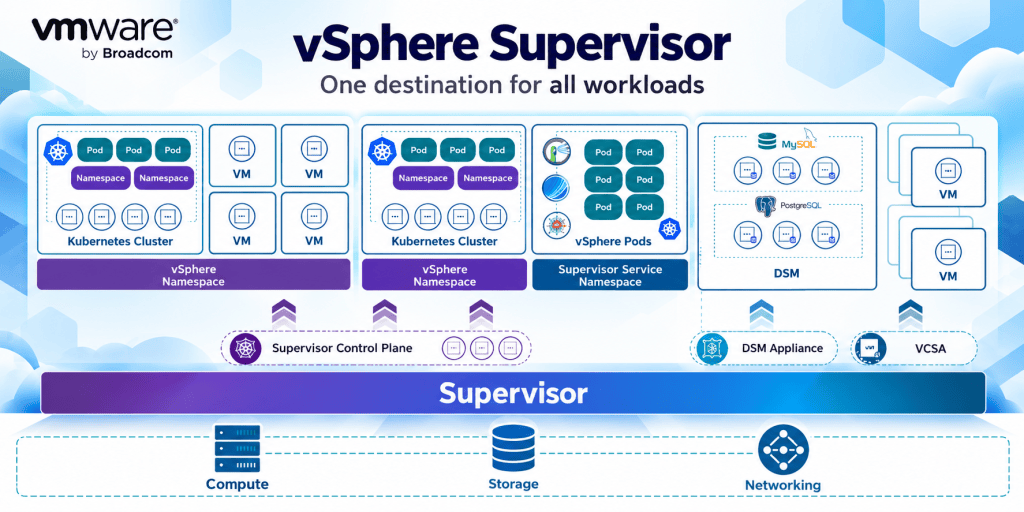
The supervisor cluster provides the Kubernetes control plane directly on vSphere and allows you to run guest clusters, deploy VMs via Kubernetes APIs, and integrate services like Harbor and the Private AI services. One nice aspect is that both VMs and containers can access the same pool of GPU resources, which gives you flexibility for different teams and use cases.
Networking and storage considerations
All these components are connected using NSX with VPC-style isolation, overlay networks (Geneve) and a tier‑0/tier‑1 gateway model for north‑south traffic. Each AI project or tenant can have its own isolated virtual network while still sharing the same physical infrastructure underneath.
For storage, the recommended foundation is vSAN Express Storage Architecture (ESA). ESA gives the high throughput and low latency that AI workloads usually demand, and you can use RAID‑5 or RAID‑6 erasure coding to balance performance and efficiency. On the hardware side you look for at least 100 Gb network connectivity to support vSAN ESA and advanced features like RDMA over Converged Ethernet, which helps for distributed training and GPU‑to‑GPU communication with very low latency.
There are also classic design points like anti‑affinity rules for management VMs and proper sizing of CPU and memory to keep space for both management components and AI workloads as the environment grows. vSAN storage clusters can be used as highly scalable disaggregated storage, and stretch or fault domains options help to protect workloads against host or site failures.
End‑to‑end AI pipeline inside VCF
At the end, the platform gives you a complete AI pipeline inside your VCF private cloud. You can: pull models from public repositories, store and manage them internally, expose them through model runtimes, index your own enterprise data in a vector store, and build RAG applications using the agent builder service.
All of this runs in a single VCF workload domain with GPU‑enabled clusters, supervisor namespaces and dedicated AI Kubernetes clusters. The result is a minimal‑footprint but powerful architecture that lets you start small with VMware Private AI, and then scale out instances, fleets and regions as your AI adoption grows.
VMware Cloud Foundation is now an AI‑native platform, and VMware Private AI Foundation with NVIDIA is the way enterprises turn their existing VCF investment into a governed, scalable backbone for Private AI.
Why Private AI on VCF matters
Enterprises want the flexibility of modern AI, but with strong privacy, governance, and predictable cost. By integrating Private AI capabilities directly into VMware Cloud Foundation 9.0, Broadcom turns VCF into a platform that can securely host AI models, data, and applications side‑by‑side with existing workloads, instead of treating AI as a separate island.
Platform layers at a glance
Layer
What it provides
Key components
Virtual infrastructure
Core compute, storage, and networking for all workloads
Model lifecycle, vector DB, indexing, agents, inference endpoints
Model Store, Model Runtime, Agents
Consumption
Interfaces for admins and developers
GUI, CLI, APIs, IaC tools
These layers allow platform teams to keep using familiar operational tools while exposing AI and data services through standardized, self‑service interfaces.
Privacy, security, and model lifecycle
A core design goal is treating models as first‑class corporate assets that need governance just like containers or images. Model Store uses Harbor as a registry for models and NVIDIA inference containers, allowing security teams to scan, approve, and control access via RBAC and dedicated projects. The platform supports air‑gapped deployments by using curated, on‑premises repositories for AI images and libraries, which is crucial for organizations with strict data sovereignty or regulatory requirements.
GPUs as first‑class citizens
VCF 9.0 takes GPUs from “special snowflakes” to managed, schedulable resources. The platform supports NVIDIA vGPU, allowing administrators to carve a physical GPU into multiple vGPU profiles, time‑slice capacity, or reserve larger profiles for demanding models while retaining features like vMotion. New hardware support includes accelerated platforms such as NVIDIA Blackwell B200 and RTX 6000‑class GPUs, enabling both high‑end training and large‑scale inference on‑premises.
GPU consumption and visibility
Aspect
Capability in VCF 9.0
vGPU profiles
Multiple profiles per GPU for different workload sizes
Mobility
vMotion support for VMs with vGPU attached
Capacity planning
Cluster‑level view of vGPU usage and remaining capacity
Telemetry
Utilization, memory, temperature via operations console
These capabilities help avoid GPU hoarding and fragmentation, ensuring expensive accelerators serve the highest‑value workloads.
Model Store and secure onboarding
Models typically arrive as large data files rather than VMs or containers, and Private AI treats them accordingly. Organizations can pull open models into a controlled onboarding workflow: evaluate in a dedicated environment, scan for vulnerabilities or policy issues, and then promote into Harbor projects as “approved” or “unapproved” models. Once in Model Store, these assets can be reused by multiple teams without repeated manual downloads or ad‑hoc security checks, significantly reducing operational friction.
Model Runtime: models as a service
Model Runtime turns stored models into production‑ready endpoints, deployed as infrastructure‑as‑code or via self‑service UI. It supports both completions models (LLMs) and embedding models, wiring them to appropriate inference engines and GPUs under the hood. A key design choice is OpenAI‑compatible APIs: existing applications that target the OpenAI API can often be redirected to on‑prem endpoints, letting teams move workloads from public cloud to private infrastructure with minimal code change and lower total cost of ownership.
Model services and APIs
Capability
Description
Completions models
LLMs exposed via standardized API endpoints
Embedding models
Engines optimized for vector embeddings and RAG
OpenAI API compatibility
Drop‑in migration path from public to private endpoints
Horizontal scaling
Replicas for throughput and resilience
This abstraction lets platform teams upgrade or switch models while keeping a stable interface for consuming applications.
Data services, vector DB, and RAG
Private AI is not only about models; it is about connecting those models to enterprise data. Data Services Manager provides database‑as‑a‑service capabilities and can expose PostgreSQL with pgvector, effectively acting as a vector database for embeddings used in retrieval‑augmented generation (RAG) workflows. A Data Indexing and Retrieval service then crawls multiple sources—object storage, collaboration tools, file repositories—chunks content, generates embeddings, and populates knowledge bases that AI agents can query.
Agents, knowledge bases, and MCP
On top of models and vector stores, the platform introduces an AI agent builder that attaches agents to specific knowledge bases with fine‑grained access controls. This allows different business units to run agents over distinct slices of the corporate corpus without bleeding data across domains. Planned support for Model Context Protocol (MCP) will let agents interoperate with a large ecosystem of MCP servers—covering systems like Slack, GitHub, ServiceNow, and databases—so agents can not only query data but also trigger actions within enterprise systems.
Operational visibility and AI‑assisted operations
All of this only works if infrastructure teams can see how GPUs and AI services are being used. VCF 9.0 introduces improved visibility into vGPU profiles, consumption per cluster, and detailed GPU telemetry, empowering capacity planning and chargeback/showback. An intelligent assistant, powered by the same Private AI capabilities, surfaces documentation and contextual guidance inside the management UI, making it easier to operate the platform at scale
Workloads are moving back from the Cloud. #vExpert Gabi Nunes talks about his trending blog article that covers what you need to do to bring workloads back, and why!
VMware Cloud Foundation (VCF) 9.0 introduces major architectural and operational enhancements for modern private cloud deployments. This article provides a technical deep dive into its core themes, covering architecture models, operational concepts, networking, storage, and key best practices relevant for enterprise IT teams and architects.
Core Architecture Themes
VCF 9 builds on refined domain-based architecture, enabling seamless scalability for both management and workload clusters. The solution is comprised of VCF Instances, each containing a management domain and multiple workload domains, all orchestrated through SDDC Manager. Version 9 brings more flexible fleet management to coordinate multiple instances, offering unified automation and life cycle control.
Separate management and workload clusters for resilience
Topology
Employ multi-rack, multi-site for high availability and failover
Fleet Management
Use automated, centralized operations for upgrades and patching
Operations and Automation
Operations in VCF 9 revolve around centralized life cycle management and automated monitoring. VCF Operations features single UI dashboards for fleets, intelligent log analytics, and sophisticated monitoring, integrating seamlessly with Aria Operations and leading SIEM platforms. Automated upgrades can be performed with zero downtime leveraging new live patching capabilities
Recommended Operational Workflows
Workflow
Recommended Tool/Service
Description
Fleet Management
SDDC Manager, VCF Automation
Centralized patching, configuration, upgrades
Monitoring and Log Analysis
Aria Operations/Log Insight
Correlated logs, health checks, capacity analysis
Automation and API Integration
PowerCLI, REST, Terraform
Infrastructure-as-Code for deployments and recovery
Networking and Security
Networking in VCF 9 leverages NSX-T’s powerful overlay model. NSX Federation allows multi-site policy enforcement, network segmentation, and rapid disaster recovery across interconnected VCF Instances. Security is enhanced by full-stack RBAC, MFA integration, and continuous compliance monitoring using built-in SDDC Manager audit modules.
Diagram: NSX Federation Multi-site Model
text        [NSX Federation]
         ├─ Site A (Local NSX)
         └─ Site B (Local NSX)
             │
         [Global Policy Enforcement]
Security Recommendations
Technology
Best Practice
Rationale
NSX Federation
Global policies, microsegmentation
Tenant isolation and rapid DR
Identity Broker
SSO, MFA
Enhanced authentication
Compliance
Periodic audits, drift management
Maintain regulatory posture
Storage Innovations
VCF 9 centers storage architecture around vSAN Express Storage Architecture (ESA), supporting end-to-end NVMe, global deduplication and compression, and cross-cluster “HCI Mesh” sharing. Clusters may also integrate legacy NFS or Fibre Channel storage for hybrid deployments. Always size clusters based on workload IOPS/latency targets, and validate network links (10GbE+ recommended).
This post outlines critical design decisions architects should consider when planning and deploying VMware Cloud Foundation (VCF).
1. VCF Constructs and Architecture
VCF private cloud is composed of hierarchical constructs with clear management responsibilities:
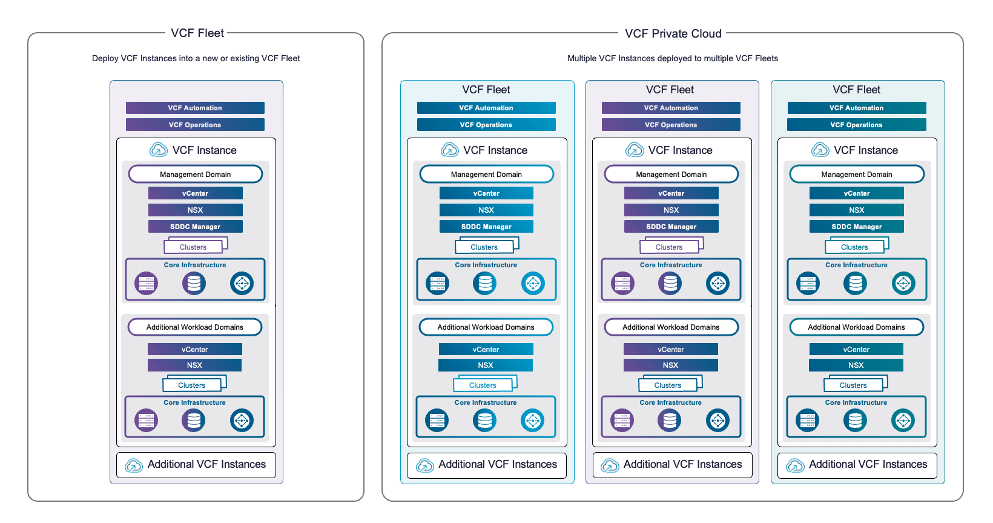
VCF Instance: Includes a management domain and optional workload domains with core components such as vCenter, NSX, SDDC Manager, and ESX hosts.
VCF Fleet: Manages one or more VCF Instances along with fleet-level components like VCF Operations and VCF Automation.
VCF Private Cloud: Represents the highest level aggregating one or more VCF Fleets.
Architects must design with these constructs in mind, determining how many instances and fleets are needed based on scale, organizational boundaries, and operational models.
2. VCF Operations Deployment Models
VCF Operations is the central management console with deployment options affecting availability and recovery:
Simple Model: Single node, minimal footprint. Suitable for small environments but slower recovery after failures.
High Availability (HA) Model: Three-node cluster with rapid failure recovery and optional external load balancer for scaling.
Continuous Availability Model: Dual nodes across availability zones providing no service interruption upon failure, suitable for multi-site deployments.
Choose the appropriate model balancing resilience requirements and cost.
3. Workload Domain and vSphere Cluster Models
Workload domains segregate resources for applications and can contain one or more vSphere clusters.
Management Domain: Contains core management appliances and fleet components. It may also run workloads if needed.
Workload Domains: Run customer applications, isolated by separate vCentres and Single Sign-On domains if required.
vSphere clusters are selected based on availability:
Single-Rack: Suitable for minimal footprint, fault domain within a rack.
Multi-Rack (Layer 2 or 3): Spans multiple racks with fault isolation for higher availability.
Stretched Clusters: Extend across availability zones for resilience against site failures.
4. Networking and Distributed Switch Models
Networking underpins the entire platform with design options affecting performance and isolation:
Distributed Switch Models: Range from a single switch supporting all traffic to complex models separating storage, workload, and management traffic onto different switches for maximum bandwidth and isolation.
Network Fabric Models: Options include single-rack, multi-rack, or availability zone fabrics supporting different cluster models.
Fleet-Level Networking: Choices include shared or dedicated management networks and overlay or VLAN NSX segments.
Design for scalability, security, and operational simplicity when selecting switch and fabric models.
5. Storage Architecture and Models
VCF supports various principal and supplemental storage models:
vSAN ESA and OSA: Provide hyperconverged storage with one-tier or two-tier architectures using NVMe or mixed disk types.
External Storage: Fibre Channel or NFS arrays can be integrated via supplemental datastores.
Storage Clusters: Disaggregated storage clusters provide flexibility for scaling storage and compute independently.
Selection depends on performance needs, availability targets, and existing storage infrastructure.
6. Identity and Authentication Models
Authentication uses VCF Identity Broker and Single Sign-On services:
Identity Broker Models: Embedded within vCenter for simplicity or as a dedicated appliance cluster for higher availability.
Single Sign-On Models: Scale from per-instance to fleet-wide brokers based on scale and isolation needs.
Design identity services to avoid single points of failure and enable seamless access across VCF components.
7. Supervisor and Kubernetes Integration Models
vSphere Supervisor enables Kubernetes workload management with options including:
Management Zones: Single or three-zone models for control plane availability and workload isolation.
Control Plane Availability: Simple (single node) or HA (three nodes) control planes.
Load Balancers: NSX, Avi, or Foundation Load Balancer based on networking model and scalability requirements.
Architects must balance resource allocation, operational complexity, and Kubernetes workload expectations.
8. Design Blueprints and Expansion Paths
Pre-defined design blueprints provide prescriptive architectures for common use cases:
Single site minimal footprint for small-scale deployments.
Single site with multi-rack and high availability.
Multi-site designs across regions with disaster recovery considerations.
VCF enables flexible expansion by adding hosts, clusters, workload domains, or instances, supporting evolving business and technical needs.
Upgrading legacy vSphere environments to VMware Cloud Foundation (VCF) 9.0 is a strategic move for organizations seeking unified management, advanced automation, and simplified fleet operations. This comprehensive walkthrough details each stage of such an upgrade, leveraging an existing Aria Suite Lifecycle Manager installation and Aria Operations, culminating in an enterprise-grade, converged VCF 9.0 fleet.
Step 1: Preparing the Aria Suite Lifecycle Manager
Begin by assessing the Aria Suite Lifecycle Manager version in use. If running version 8.18, ensure Patch 2 is applied. Patch 2 is critical—it brings foundational awareness of VCF 9.0, enabling downstream upgrade operations. The patch must be retrieved from the Broadcom Software Portal, manually transferred to the Lifecycle Manager appliance, and mapped using its binaries feature. Note: Applying this patch triggers an automatic appliance reboot. Verify both version and patch level post-application to ensure readiness.
Step 2: Upgrading Aria Operations and Deploying Fleet Management
With Patch 2 in place, initiate the upgrade of Aria Operations to version 9.0. This process requires uploading two key artifacts to the Lifecycle Manager: the Aria Operations 9.0 upgrade package and the Fleet Management OVA template. Use the Lifecycle Manager’s binary mapping to make these accessible for the operation.
Select the correct license type for your intended deployment (VCF or VVF), as licensing governs feature enablement within Fleet Management. Launch the upgrade workflow, perform the pre-upgrade assessment, and follow best practice: do not proceed on failed pre-checks—remediate all detected issues first.
Upon workflow initiation, the Aria Operations cluster will be brought offline and a snapshot taken. The deployment prompts for vCenter information to place the Fleet Management appliance correctly within the infrastructure, including network, DNS, NTP, and access credentials. Complete a thorough pre-check to verify environmental health before proceeding.
Upon successful deployment, confirm the following:
Aria Operations is now version 9.0, integrated with Fleet Management.
The previous Operations instance is deregistered from the Lifecycle Manager and re-registered with Fleet Management.
The Lifecycle Manager will continue managing components such as Aria Operations for Logs and VMs, running in parallel until a full environment transition is complete.
Step 3: Upgrading the vSphere Layer
Proceed to upgrade vCenter Server using the official ISO and the vCenter Upgrade Wizard, utilizing the reduced downtime process. This method temporarily stands up a target vCenter appliance, replicates the configuration and data, and eventually assumes the original identity and network configuration. Carefully validate the new vCenter instance post-upgrade.
To upgrade ESXi hosts, use the vSphere Lifecycle Manager (VLCM) to import the ESX 9.0 image depot (ZIP archive), create a new cluster image, and assign it to the cluster. Remediate the cluster by initiating compliance and update operations, which will:
Place each host into maintenance mode (evacuating VMs as needed)
Install and boot the new ESXi version
Return hosts to the cluster sequentially via DRS scheduling
Repeat for all cluster hosts, ensuring all are running ESXi 9.0.
Step 4: Deploying and Configuring the VCF Installer
Next, deploy the VCF Installer by uploading and powering on the SDDC Manager OVA. This appliance replaces the legacy Cloud Builder and initially runs in installation mode. For binary acquisition, configure either an online or offline depot. For online depots, authenticate using a Broadcom software token; for offline deployments, establish a local web server and stage binaries as needed.
With binaries available, use the deployment wizard to:
Deploy a new VCF fleet or add to an existing fleet
Specify usage of existing infrastructure (operations, vCenter, automation)
Assign deployment models: simple (single-node) or high availability (three-node clusters per management component)
Provide all required instance configuration parameters, opt for password auto-generation or manual assignment, and link the existing upgraded Aria Operations 9.0 instance and Fleet Management using credentials and API integrations.
Step 5: Automation, NSX, and Management Domain
If no prior VCF Automation instance is available, opt to deploy a new one by supplying the necessary appliance and networking details. For NSX Manager, select the deployment type and provide configuration for cluster and appliance FQDNs, passwords, and overlay options. For production, best practice dictates isolating overlay networking on separate physical interfaces; use the management kernel network overlay only for non-production or transitional scenarios.
Step 6: Final Convergence and Deployment
Complete the installer inputs—optional download or editing as JSON for future automated deployments. Validate the configuration, reviewing and acknowledging warnings (after careful assessment), and ensuring all errors are cleared before proceeding.
Monitor the deployment workflow in real-time; the entire process may take from 90 minutes to four hours depending on environment size and redundancy. If failures occur, utilize built-in retry and diagnostics to resolve and continue.
After deployment, verify:
The environment inventory reflects new resource pools and grouped management components (SDDC Manager, vCenter, Operations Collector, Automation)
Fleet Management and Operations dashboards indicate accurate status and registration
Existing workloads remained running and non-disrupted during the convergence (with minimal exceptions for inventory and service creation)
Conclusion
This process transforms a loosely coupled vSphere 8.x setup into a tightly integrated VCF 9.0 fleet, delivering unified lifecycle management, streamlined upgrades, and consistent automation. The outlined steps ensure a non-disruptive transition, while strategic design and thorough validation minimize risk and support seamless operations throughout