VMware by Broadcom has announced that the NSX Migration for VMware Cloud Director tool will be available as an open-source toolkit on its GitHub repository.
Key Highlights of the Open-Source Release
Accessibility: The open-source availability of the NSX Migration tool will make it more accessible to a wider range of users, allowing them to customise and extend its capabilities to meet their specific needs.
Community Collaboration: By releasing the tool as open-source, VMware invites contributions from the community, fostering collaboration and innovation. This collaborative approach will enhance the tool’s functionality and ensure its ongoing relevance.
Enhanced Customization: With the open-source release, users will have the freedom to tailor the tool to their unique requirements, adapting it to their specific NSX environments and configurations.
The NSX Migration tool simplifies the process of migrating from NSX for vSphere to NSX-T Data Center, eliminating the complexities and potential risks associated with manual migrations. It automates many of the tasks involved, ensuring a smooth and efficient transition.
The vExpert community is a global network of VMware experts who are passionate about sharing their knowledge and expertise with others. vExperts provide valuable insights and guidance to the VMware community, helping organizations to use VMware technologies to their fullest potential.
What is a vExpert?
A vExpert is a recognized expert in VMware technologies who has made significant contributions to the VMware community. vExperts are nominated by their peers and selected by VMware based on their technical expertise, community involvement, and passion for VMware.
What are the benefits of being a vExpert?
There are many benefits to being a vExpert. These include:
Access to exclusive vExpert resources
Opportunities to network with other VMware experts
Recognition for your contributions to the VMware community
The chance to influence the future of VMware technologies
How can I find a vExpert?
The vExpert Directory is a great resource for finding vExperts in your area. You can also search for vExperts on social media using the hashtag #vExpert.
I am a vExpert, how can I get involved?
There are many ways to get involved with the vExpert community. These include:
Writing blog posts and articles
Giving presentations at user conferences
Answering questions in the VMware forums
Mentoring new vExperts
The vExpert community is a valuable resource for anyone who is interested in learning more about VMware technologies. If you are passionate about VMware, I encourage you to get involved with the community.
In addition to the above, here are some other benefits of being a vExpert:
Early access to new VMware products and technologies
Invitations to exclusive VMware events
Opportunities to collaborate with VMware employees
The chance to have your voice heard by VMware
How to Become a vExpert
To become a vExpert, you must have a proven track record of contributing to the VMware community. This could include writing blog posts, speaking at events, participating in forums, or contributing to open source projects.
If you are interested in becoming a vExpert, you can learn more about the program and apply on the following website.
In addition to the benefits listed above, becoming a vExpert can also be a great way to give back to the community and help others. vExperts play a vital role in helping to spread knowledge and best practices about VMware technologies.
If you are passionate about VMware technologies and you are looking for a way to get involved in the community, becoming a vExpert is a great option.
I hope this blog post has given you a better understanding of the vExpert community.
If you have any questions, please feel free to leave a comment below.
I would also like to add that the vExpert community is a very welcoming and supportive group. If you are new to VMware, I encourage you to reach out to a vExpert in your area. We will be happy to help you get started.
VMware Cloud Director 10.5.1 is now available, and it brings a number of new features and enhancements to the cloud management platform. This release is focused on simplifying cloud operations, enhancing security, and improving automation.
Some of the highlights of VCD 10.5.1 include:
VMware Cloud Director Cell Certificate Management Through the UI
Newly generated self-signed certificates include SubjectKeyIdentifier and AuthorityKeyIdentifier certificate extensions
VCD Tenancy Aligned to NSX Projects
Provider Topology Intentions
Advertisement Strict
Advertisement Flexible
All Networks Advertised
Configuration of NAT and Firewall Service Intentions on a Provider Gateway
NAT For Provider Gateway
Firewall Rules Configuration on Your Provider Gateway
BGP Provider and Tenant Configuration
BGP Permission Groups Configuration
NSX Advanced Load Balancer Self-service WAF
NSX Advanced Load Balancer Virtual Service Logging Analytics
DHCP Static Bindings
More than one IdP integration with VMware Cloud Director
End User License Agreement (EULA) for Container Applications Imported from VMware Marketplace
VMware Cloud Director Encryption Management
New Organization: Traversal Right
Standalone Virtual Machine Metadata Tags
The VMware Cloud Director UI displays the current organization name
Here are some additional resources that you may find helpful:
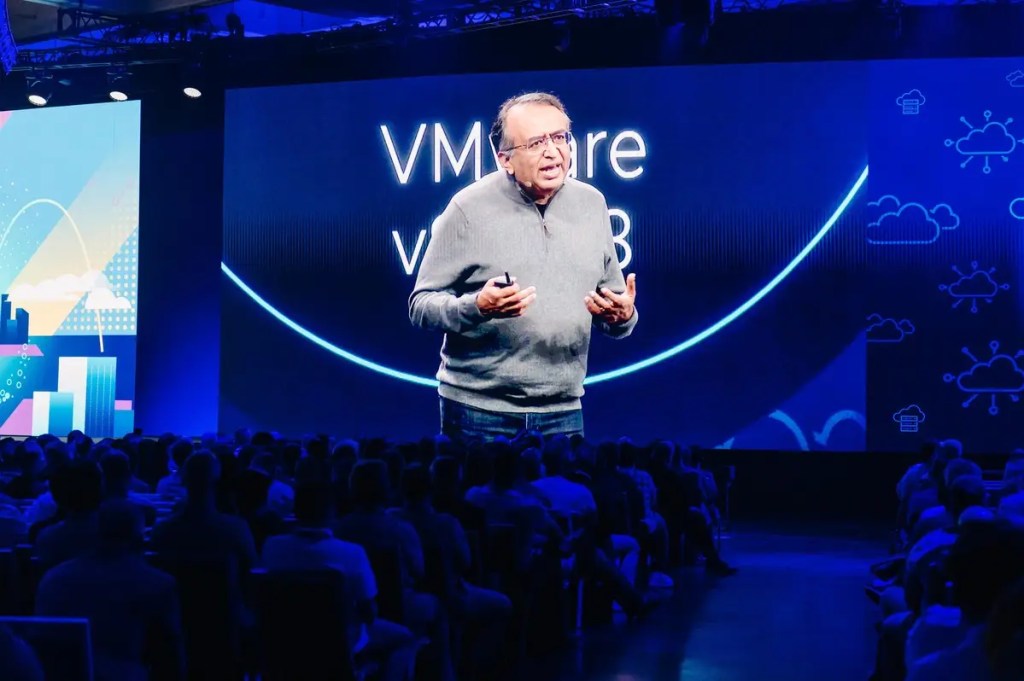
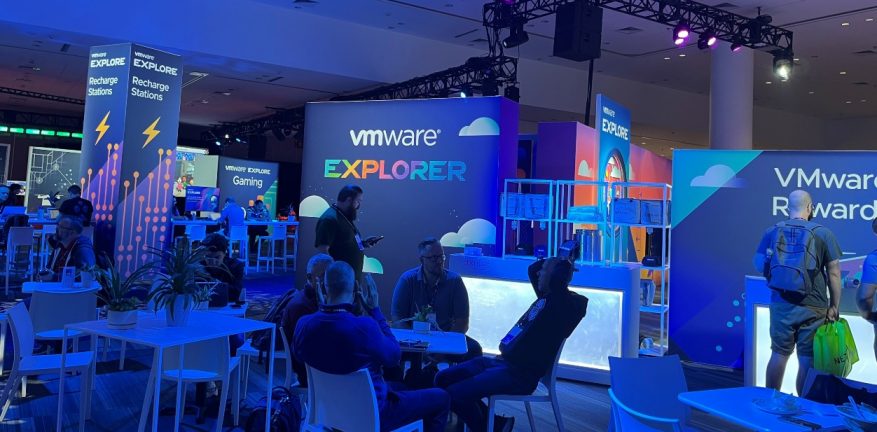
Next week, I’ll be attending VMware Explore, the largest cloud-native event in the world. I’m excited to learn about the latest innovations in multi-cloud, cloud-native computing, and digital transformation. I’m also looking forward to networking with other IT professionals and industry experts.
VMware Explore is a great opportunity for IT professionals to learn about the latest trends and technologies in cloud computing. The event features a wide range of sessions, hands-on labs, and workshops on topics such as:
Multi-cloud management
Cloud-native application development
Security and compliance
Digital transformation
And more!
I’m particularly interested in learning more about how VMware is helping organizations to accelerate their cloud transformation journey. I’m also looking forward to hearing from industry experts about the latest trends in cloud computing and how they are impacting businesses of all sizes.
In addition to the educational sessions, VMware Explore is also a great opportunity to network with other IT professionals and industry experts. The event features a variety of networking events, such as receptions, dinners, and after-hours parties. I’m looking forward to meeting new people and learning about their experiences with VMware technologies.
If you’re attending VMware Explore next week, be sure to stop by and say hello! I’ll be at the VMware booth and at some of the sessions. I’m always happy to talk about cloud computing and VMware technologies.
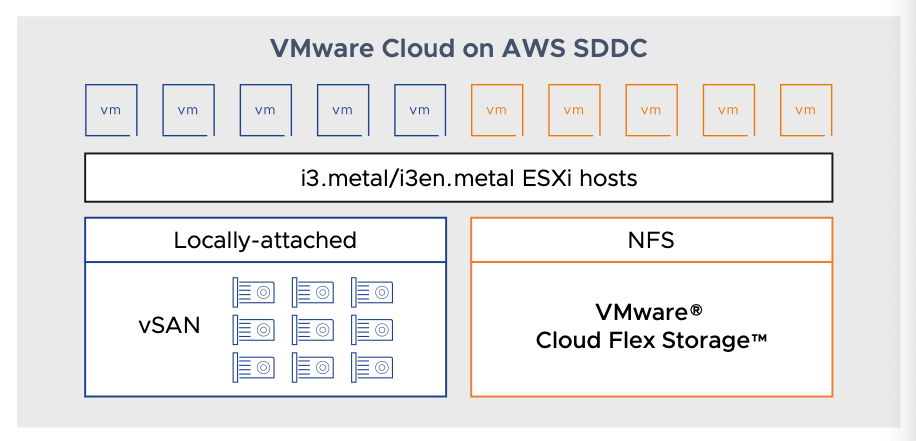
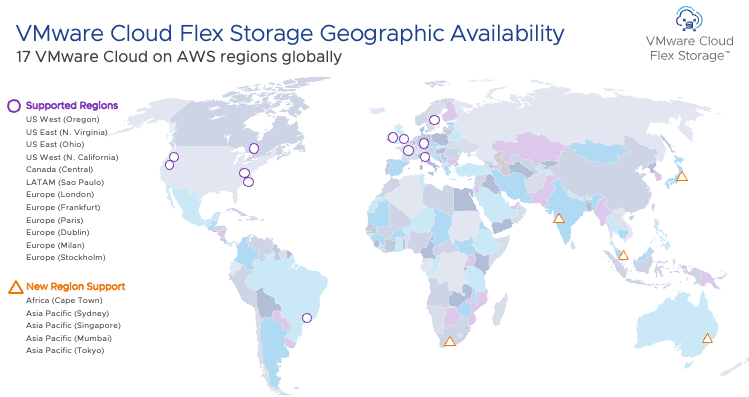
VMware Cloud Flex Storage delivers a disaggregated, elastic, and natively integrated storage service for VMware Cloud on AWS that is fully managed by VMware. With VMware Cloud Flex Storage, partners can scale storage and compute independently of each other and pay for only the resources they use.
With unparalleled power and flexibility, VMware Cloud Flex Storage offers:
• Independent scaling of storage capacity so you can scale storage capacity without purchasing additional hosts.
• On-demand and elastic scaling of storage to elastically adjust storage capacity up or down as needed.
• Natively integrated storage service for VMware Cloud on AWS with the ability to easily attach datastores with a few clicks from the VMware Cloud Console.
• Fully managed solution that is sold, operated, and directly supported by VMware.
• Built-in enterprise-class storage features that utilize built-in, always-on data services, including at-rest encryption, global deduplication and compression, and data integrity.
• Flexibility to pay only for the storage that you consume under a simple price per GB pricing model.
VMware CSE (Container Service Extension) 4.1 was launched by VMware.
New Features:
Airgap functionality: VMware Cloud Director Container Service Extension 4.1 can function in an airgapped environment through the use of a local container registry.
Node Health Check Configuration: It is now possible to configure Node Health Check parameters in a Tanzu Kubernetes Grid clusters through the Kubernetes Container Clusters 4.1 UI plug-in. Such parameters can detect node failure, and ensure node remediation.
Minor version upgrade: You can now perform a minor version upgrade for the VMware Cloud Director Container Service Extension server through the Kubernetes Container Clusters 4.1 UI plug-in.
The Auto-repair on Errors toggle in the Tanzu Kubernetes Grid cluster creation workflow is deactivated by default in VMware Cloud Director Container Service Extension 4.1. Service providers must advise tenant users of this as it is a behavioral change from VMware Cloud Director Container Service Extension 4.0.
Ability to view Tanzu Kubernetes Grid clusters in Kubernetes Container Cluster UI that were created directed in the Kubernetes Cluster API Provider for VMware Cloud Director (CAPVCD) command line.
Additional Tanzu Kubernetes Grid and Kubernetes support: It is now possible to use the following Tanzu Kubernetes Grid and Kubernetes versions with VMware Cloud Director Container Service Extension 4.1:
Tanzu Kubernetes Grid 2.1.1 with Kubernetes 1.22, 1.23, and 1.24. Tanzu Kubernetes Grid 2.2.0 with Kubernetes 1.23, 1.24, and 1.25
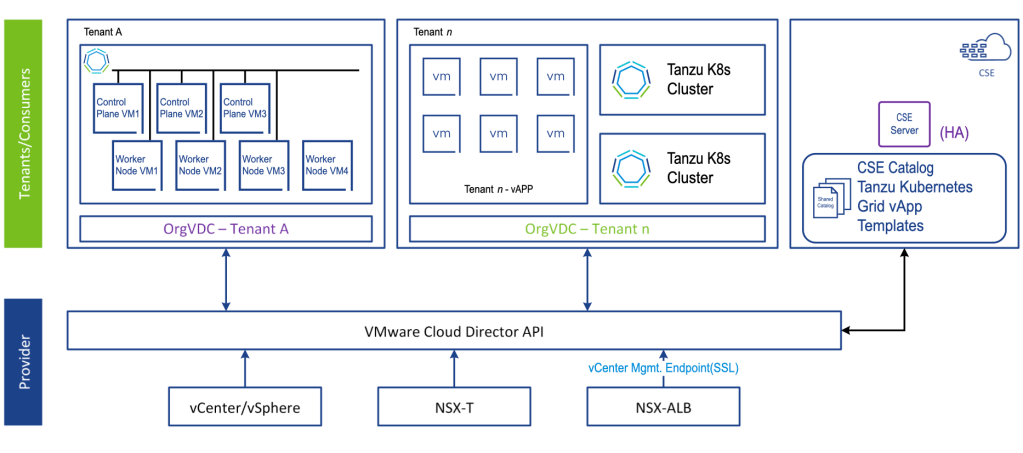
VMware Cloud Director Container Service Extension Logical Architecture
VMware today announced the release of VMware Cloud Director 10.5
The new release includes a number of new features and enhancements, including:
Content Hub – Enhanced Catalog and Content Management
This release introduces a completely new user experience to providers and tenants for accessing application images, such as vApp Templates, ISO files, and container application images in the form of Helm charts. Providers can create and share to tenants catalogs that are backed by the local VMware Cloud Director storage, or populated with application images that are imported from VMware Marketplace and third-party Helm chart repositories. Content Hub merges the existing VMware Cloud Director Catalog and App Launchpad into a unified experience for tenants and providers. Content Hub does not require installing any additional components.
NSX Federation with VDC Groups
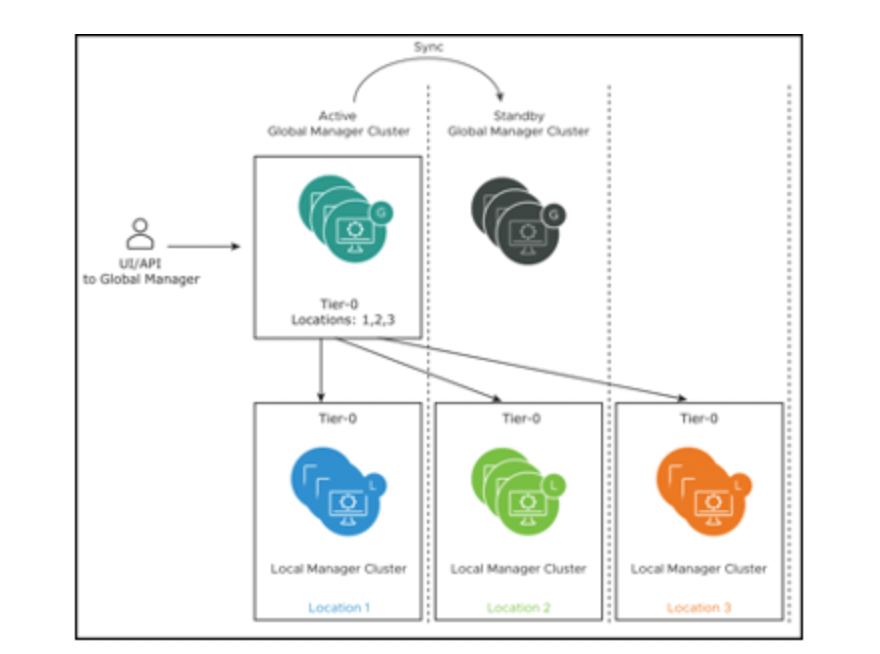
VMware Cloud Director now supports NSX Federation. You can register an NSX Global Manager instance that coordinates security policies across regional local NSX Manager instances in your VMware Cloud Director environment. You can include up to 4 NSX Manager instances in a single VDC Group. Using NSX Federation with VMware Cloud Director is limited to Stretched Tier 0 and Tier 1 Gateways. This means that the provider gateway that is associated with your global NSX Manager instance and with a data center group defines the boundaries of the data center group. By leveraging NSX Federation, you have more choices in establishing networking availability zones by disaggregating NSX Manager instances across regional data centers.
NSX Advanced Load Balancer HTTP Policies
VMware Cloud Director 10.5 provides a tenant self-service UI for NSX Advanced Load Balancer HTTP policies configuration for virtual services. The functionality includes HTTP request, HTTP response, and HTTP security policies. You can use HTTP request policies to modify requests before they are either forwarded to the application, used as a basis for content switching, or discarded. You can use HTTP response policies to evaluate and modify responses and response attributes that a virtual application returns. Finally, you can also use HTTP security policies to configure allowing or denying certain requests, to close a TCP connection, to redirect a request to HTTPS, to apply a rate limit, or to provide a static page response in case of an outage
IP Spaces Migration UI Wizard
You can use the IP Spaces Migration UI wizard to migrate any provider gateway in your environment to IP spaces from the legacy IP blocks
BGP Enhancements
The new BGP route maps tab allows customers to specify additional configurations for route redistribution. The route maps are only available to provider gateways that use IP spaces. You can configure route maps with IP prefixes and community lists that are defined on the provider gateway in the other BGP tabs.
Improved Firewall Rules UI
VMware Cloud Director 10.5 provides enhanced user experience for firewall rule expressions. You can now create a single firewall rule and, optionally, position it at a specific position in the rules list, and reorder a single firewall rule without editing the entire list of existing firewall rules. You can also add ranges and individual IP addresses directly into the firewall rule Source and Destination text boxes. Firewall rules now have a loggingId element that corresponds to the NSX rule_id.
Generation of Autoconfigured Default NAT and Firewall Rules for Edge Gateways and Provider Gateways
If you are using IP spaces, you can generate and apply autoconfigured default SNAT, NO SNAT, and firewall rules on edge gateways and provider gateways in your environment. VMware Cloud Director autoconfigures the SNAT, DNAT, and firewall rules depending on the topology of the relevant IP spaces and their external and internal scopes
Reduced the time it takes to sync content during in catalog publish-subscribe across Cloud Director instances. The publish – subscribe sync is also more resilient with respect to data transfer disruptions. In our testing catalog sync of a vApp template of size 10 GB that would take over 1 hour to sync in previous releases would now complete in under 15 minutes. This was achieved by breaking up data into chunks and introducing concurrency in data transfer.
Ability to Upgrade Solution Add-Ons and to Publish Solution Add-Ons to Tenants
VMware Cloud Director 10.5 introduces the ability to upgrade your solution add-on instances when a new version becomes available. You can also publish solution add-ons to some or to all of your tenants
Leverage Shared Datastores Across Multiple vCenter Servers
In earlier releases, when moving VMs across different vCenter Servers, the placement engine did not consider the shared datastores between the vCenter Servers. This resulted in a copy operation involving export and import of the OVF. Starting with VMware Cloud Director 10.5, the placement engine provides shared datastore recommendations to prevent the OVF export and import workflow, and optimizes the move operation by making it faster.
Tenant Migration enhancementsIn previous releases, Migrate Tenant Storage would move the VMs and disks regardless of whether the disks are on the selected source datastores. Starting with VMware Cloud Director 10.5, the operation will only move the disks that are on the source datastores.
VM discovery enablement at the organization and organization VDC levels
In previous releases, you can configure VM discovery in VMware Cloud Director at the global level, organization level, and organization VDC level but the global level had precedence over the organization level and the organization level had precedence over the organization VDC level. In versions 10.4.x and earlier, if VM discovery is deactivated at the global level, you cannot activate it at the organization or organization VDC level. Starting with VMware Cloud Director 10.5, you can override the global level VM discovery setting at the organization and organization VDC levels. If you use the /api/admin/extension/settings/general API to set the AllowOverrideOfVmDiscoveryByOrgAndOVDC parameter to true, the organization and organization VDC VM discovery behavior can override the setting at the global level.
vCenter Server can back both a provider VDC and a dedicated vCenter Server instance
Starting with VMware Cloud Director 10.5, a provider administrator can activate two advanced settings so that a vCenter Server instance can back both a provider VDC and a dedicated vCenter Server instance. This is an advanced configuration that exposes risks and must only be activated by experienced VMware Cloud Director administrators.
Last week, VMware released VMware Cloud Director Availability (VCDA) 4.6, introducing new features and improvements:
vSphere to vSphere Recovery Plans Can now also be created and run for vSphere DR and migration between vCenter Server sites.
Audit Logs Now allow auditing the VMware Cloud Director Availability events by using the Cloud Director delivery channel. VMware Cloud Director automatically marks all external events, like the ones received from VMware Cloud Director Availability, as audit events, subject to audit persistence, retention, and export capabilities by using the audit trail system in VMware Cloud Director.
Recovery Settings Enhancements Now you can map the source and the destination networks per selected replications for on-premises to cloud replications, similarly to the ones from cloud to cloud. vSphere DR and migration now validates the recovery settings (data center, VM folder, compute, and others) based on the replication settings (datastore). The network settings now are similar to Cloud Director sites, and the source and destination network mappings allow per-virtual machine network mapping.
vSphere to vSphere DR and Migration Public API Now VMware Cloud Director Availability provides a step-by-step guide to configure a deployed appliance by using the VMware Cloud Director Availability API
NSX-T vApp Edges Support VMware Cloud Director Availability 4.6, backed by VMware Cloud Director 10.3 or later, now supports:
Replicates routed vApp networks and vApp network services to virtual data centers backed by NSX with error-free automatic destination network mapping.
Replicates the DHCP service on vApp isolated networks, bringing parity with NSX for vSphere.
To configure a routed vApp network and use any vApp network services, like DHCP in isolated vApp networks, the containing organization’s virtual data center must be configured with an edge cluster.
Guest Customization Global Setting A global setting that affects all replications – whether the users need to manually activate or deactivate guest customization on failover
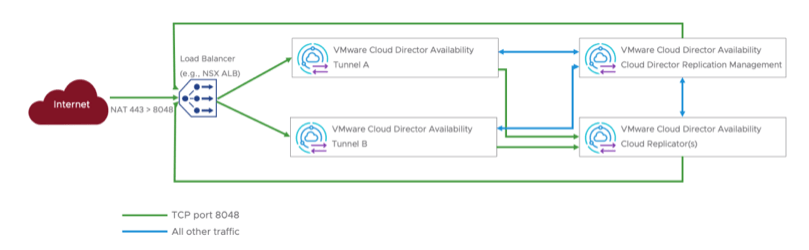
Tunnel Appliance High Availability In Cloud Director sites, now a second Tunnel Appliance can operate in an active-active mode for high availability of the Tunnel Service, both for new deployments and for upgraded ones.
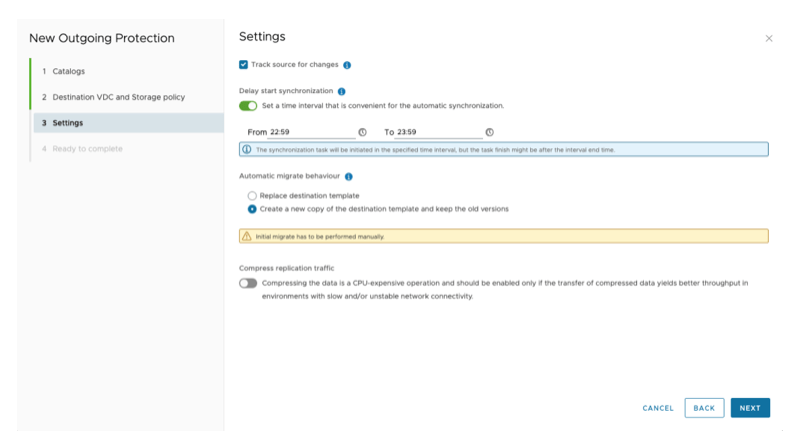
vApp Template Replication Replicating vApp templates between Cloud Director sites now includes protecting the vApp templates that permit tracking the source for changes, allowing either creating new destination template versions when the source changes or overwriting the destination.
Now with the email delivery channel configured, tenants and providers can subscribe to a weekly summary email. The subscribers can remain informed about what is happening with their replications without logging in to VMware Cloud Director Availability.
In Cloud Director sites, as a provider, you can now see an activity summary report in the management interface.
vSphere to vSphere Bandwidth Throttling Bandwidth throttling can now also apply throttle for vSphere DR and migration. Note: Applying the limit requires one or more external Replicator Appliance instances.
VMC data engine Now allows creating migrations back to the On-premises vCenter Server.
On April 18th, 2023, VMware Cloud Director 10.4.2 was released, bringing a range of new features. In this blog post, we will highlight some of the key features of this new release.
One of the most significant additions to VMware Cloud Director 10.4.2 is support for Virtual Trusted Platform Module (vTPM) devices. vTPM devices provide improved security to the guest operating system and can be added to both new and existing virtual machines. However, specific prerequisites must be met by both the VM Guest OS and the underlying vCenter Server infrastructure to use vTPM. vTPM is supported in most VCD workflows for Virtual Machine, vApp, Templates, and Catalog Sync.
Another feature in this release is the IDP Proxy for TMC Local. This feature allows VMware Cloud Director to be configured as an identity provider proxy server. With OAuth 2.0 OpenID Connect compliant Identity Providers registered with VMware Cloud Director, relying parties can utilize the platform for tenant-aware user authentication of those already known to the system.
VMware Cloud Director 10.4.2 also includes an improved provider login experience. When accessing the login page at https://vcloud.example.com/ and entering “system” as the organization name, the platform now understands “system” as an organization and will redirect the user to the Service Provider Admin Portal login page.
In previous versions of VMware Cloud Director, the default vApp lease expiration time for newly created tenant organizations was set to 7 days. However, with version 10.4.2, the default vApp lease expiration time setting is now “unlimited” or “never expires.” This change is sure to be a welcome one for many users.
Finally, VMware Cloud Director 10.4.2 introduces two key use cases for NamedDisk Entities. Named Disk Ownership enhances the behavior associated with NamedDisk Entities, providing more control over virtual disks’ ownership and addressing some limitations with virtual disk ownership in previous versions.
The rise of cloud computing has transformed the way businesses operate, offering an affordable and scalable solution to store and manage data. However, as cloud adoption continues to grow, concerns around data privacy and security have also increased. To address these concerns, the concept of sovereign cloud has emerged as a viable alternative to traditional cloud providers.
The concept of sovereignty is emerging as a necessary component of cloud computing for many entities that process and maintain highly sensitive data, such as national and state governments, and highly regulated industries, such finance and healthcare. National governments are also looking to expand digital economic capability and reduce reliance on multi-national firms for their cloud services.
VMware defines a sovereign cloud as one that:
• Protects and unlocks the value of critical data (e.g., national data, corporate data, and personal data) for both private and public sector organizations.
• Delivers a national capability for the digital economy
• Secures data with audited security controls
• Ensures compliance with data privacy laws
• Improves control of data by providing both data residency and data sovereignty with full jurisdictional control
While keeping data ‘in’ is a key concern for sovereignty, it is also necessary to securely share data outside of its jurisdiction when warranted. For example, cross- border policing activities and collaboration. The secure sharing and monetization of data across borders is very important as we look to the next generation of currency – data.
VMware Sovereign Cloud framework principles
Data Sovereignty and Jurisdictional Control – All data is resident and subject to the exclusive control and authority of the nation state where that data was collected. Operations are fully managed within the jurisdiction.
Data Access and Integrity – Cloud infrastructure is resilient and available in at least two data center locations within the jurisdiction with secure and private connectivity options available.
Data Security and Compliance – Information security management system controls are certified against an industry recognized global (or regional) standard and audited regularly.
Data Independence and Mobility – Support for modern application architectures to prevent vendor cloud lock-in and enable application portability and independence.
In conclusion, sovereign cloud offers several advantages that make it an attractive option for businesses that prioritize data privacy, security, and compliance. With reduced latency, cost-effectiveness, sovereign cloud providers are becoming an increasingly popular alternative to traditional cloud providers. As the demand for secure and compliant cloud solutions continues to grow, sovereign cloud providers are well-positioned to meet the needs of businesses in different industries and geographies.