The Importance of an Isolated Recovery Environment (IRE) in Cyber Recovery Strategies

In today’s digital landscape, cyberattacks pose a significant and ever-growing threat to businesses worldwide. The evidence is clear: these attacks will remain a critical concern for the foreseeable future. While the methods and tactics of attackers continue to evolve, organizations can fortify their defenses by focusing on robust recovery strategies as a vital component of a comprehensive cyber resilience plan.

At the heart of any effective cyber recovery strategy lies the Isolated Recovery Environment (IRE)—a secure, standalone “clean room” environment. This space, completely disconnected from the production data center, serves as a safe haven for handling ransomware-infected workloads. Within the IRE, organizations can power on, inspect, and recover critical systems without risking further compromise, ensuring a clean and reliable restoration process.

By integrating an IRE into your cyber defense approach, your organization can enhance its ability to bounce back from even the most sophisticated attacks, safeguarding its future in an increasingly perilous digital world.

What is an IRE/Clean Room?

An Isolated Recovery Environment (IRE) is a dedicated, secure network space designed specifically for recovering from ransomware attacks. This “clean room” environment allows organizations to safely inspect, cleanse, and restore affected workloads without risking further contamination.

While building an on-premises IRE is an option, it often involves significant upfront costs. Companies must invest in infrastructure like backup appliances, servers, network hardware, and potentially even dedicated physical sites—not to mention the ongoing management expenses.

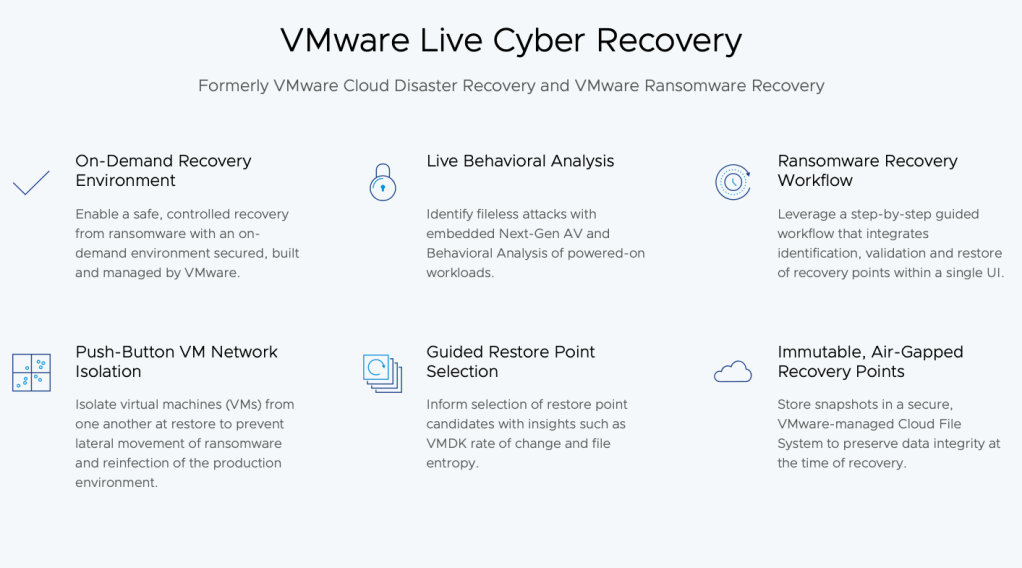
Enter VMware Live Cyber Recovery, which redefines the IRE by leveraging a VMware Cloud on AWS Software-Defined Data Center (SDDC). This cloud-based approach eliminates the need for costly physical infrastructure while simplifying deployment and management. With VMware’s Ransomware Recovery solution, businesses can quickly provision an on-demand IRE, resulting in faster recovery times, reduced operational risk, and streamlined complexity.

Key Features of a VMware-Based IRE:

  • Secure Environment: A dedicated, cloud-based network where ransomware-infected virtual machines (VMs) can be safely powered on and assessed.
  • Built-In Recovery Tools: Integrated resources for cyber response teams to verify, cleanse, and recover VM workloads efficiently.
  • Rapid Recovery with Immutable Snapshots: Easy access to immutable backups ensures quick iteration through recovery points, speeding up the restoration process.

By transitioning to a cloud-based IRE with VMware, businesses can achieve a more cost-effective, flexible, and efficient cyber recovery strategy—ensuring resilience in the face of modern threats.

Environment Isolation

A defining feature of an Isolated Recovery Environment (IRE) is its isolation—a critical element for safeguarding the recovery process from ransomware attacks. This isolation ensures that the environment is self-contained and completely separated from production systems and external networks, creating a secure space for analyzing and restoring compromised workloads.

Traditionally, this concept is referred to as being air-gapped, meaning there is no direct network connection between the IRE, production systems, the internet, or any other internet-connected devices. This parallels the idea of a “clean room”in which virtual machines (VMs) are partitioned not only from external communication but also from one another. Access to and from the clean room is strictly controlled, and no data is allowed to leave unless it has been verified and cleaned.

How the IRE Works

The primary purpose of an IRE, or recovery SDDC, is to:

  1. Power on suspect workloads from a specific snapshot.
  2. Analyze behavior within a secure, controlled environment.
  3. Clean and stage workloads for safe recovery back into production.

To maintain the integrity of this process, the IRE is exclusively dedicated to recovery operations. It is not used for other purposes, such as testing, development, or temporary capacity expansion. Additionally, no user machines at the production site are permitted direct access to recovered VMs within the IRE.

By maintaining this level of strict isolation, an IRE ensures a secure, controlled recovery process, minimizing risks and accelerating the path back to operational stability.

Streamlining Cyber Recovery with VMware Cloud and NSX in an Isolated Recovery Environment (IRE)

A critical element of an Isolated Recovery Environment (IRE) is its secure and tightly controlled network edge. In VMware’s IRE design, the network edge is configured as an independent VMware Cloud Tier-1 Gateway, ensuring that all traffic to and from recovered workloads is routed exclusively through this gateway. This architecture prevents any connection between the IRE and production, testing, development, or QA environments. The only external connectivity allowed is to the internet, with strict NAT (Network Address Translation) applied to all traffic.

Simplifying Network Configuration

The isolated IRE setup allows recovered workloads to retain their original IP addresses by creating subnet segments attached to the Tier-1 Gateway. By leveraging NAT, organizations can reuse the same IP CIDRs for disaster recovery failover and IRE configurations without conflicts. This approach also ensures secure routing across different gateways during the recovery process.

During recovery, workloads remain within the boundaries of the IRE network, enabling safe inspection and repair. For advanced analysis, you can temporarily adjust a VM’s isolation level to observe suspicious behavior or test various network configurations without exposing production environments.

Leveraging VMware NSX for Cyber Recovery

VMware NSX is integral to the success of VMware Live Cyber Recovery by automating the creation and management of networking and security configurations. Key features include:

  • Automated Firewall and Segmentation Rules: NSX generates artifacts prefixed with “CloudDR-Isolation-xx” to manage micro-segmentation and firewall rules, simplifying operations for users without advanced networking expertise.
  • Dynamic Isolation Levels: These settings control VM access to resources such as the internet (for downloading patches) or to other workloads within the IRE. This flexibility supports behavioral analysis and validation before workloads are staged for recovery.
  • Secure Quarantine Defaults: Recovered VMs are initially attached to a “Quarantine + Analysis” network rule, allowing limited outbound access to essential services (e.g., NTP, DNS, Carbon Black Cloud). This ensures integrated analysis tools like Carbon Black sensors function effectively while preventing unnecessary exposure.

Enforcing Secure Internet Access

For VMs requiring internet access during recovery, such as to download patches or security updates, traffic is strictly controlled via the NSX Advanced Firewall Gateway and NAT. No inbound internet access is allowed unless explicitly configured for specific testing purposes. To minimize risks, internet access for IRE workloads should always route through the VMware Cloud Gateway, avoiding any connection to the production environment.

Benefits of VMware Live Cyber Recovery

With VMware Live Cyber Recovery, organizations gain a streamlined, automated approach to managing network isolation and micro-segmentation within the IRE. Highlights include:

  • Ease of Use: No advanced networking skills are needed, thanks to automated artifact creation and management.
  • Integrated Tools: Built-in support for Carbon Black Cloud and other recovery tools enhances efficiency.
  • Enhanced Security: Strict isolation policies reduce the risk of infected workloads impacting production environments.

By leveraging VMware Cloud and NSX, businesses can confidently manage ransomware recovery with greater efficiency, security, and control—protecting critical assets and reducing downtime.

VMware Live Cyber Recovery Components and Architecture

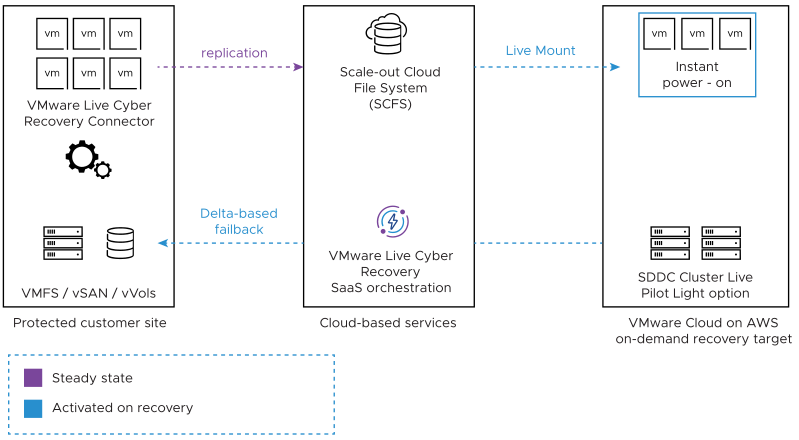
VMware Live Cyber Recovery protects VMware vSphere VMs by replicating them to a cloud file system and recovering them as needed to a VMware Cloud on AWS SDDC.

Service Components

The VMware Live Cyber Recovery service consists of the following components:

  • Cloud file system. A cloud component that enables the efficient storage of snapshots of protected VMs in cloud storage and allows VMs to be recovered quickly, without requiring data rehydration.
  • Orchestrator. A cloud component that presents a user interface (UI) to automate the disaster and ransomware recovery process on a recovery SDDC.
  • Cyber Recovery connector. A virtual appliance installed in the VMware vSphere environment to protect VMs using snapshot replication from protection groups.
  • Protection groups. A configuration component that allows you to create regularly scheduled snapshots of VMs which are replicated to the cloud file system.
  • Recovery plan. An orchestration component that defines the steps required to recover VMs from snapshots from the cloud file system to a recovery SDDC, or to recover VMs from a ransomware attack.

VMware Live Cyber Recovery cloud components (cloud file system and orchestrator) are deployed and managed by a VMware Cloud on AWS account dedicated to each tenant.

Service Architecture

The recovery SDDC is created immediately prior to performing a recovery and doesn’t have to be provisioned to support replication in the steady state.

VMware Live Cyber Recovery components work together from a protected site to cloud backup to a recovery SDDC for failover and failback.


End to End Security

Data transfers to and from protected sites to recovery SDDCs use secure replication, which ensures an SSL connection is established and used for all data transfers.

What is VMware Live recovery?


VMware Live Recovery delivers powerful cyber and data resiliency for VMware Cloud Foundation. Customers can protect applications and data from modern ransomware and other disasters across VMware Cloud Foundation environments on-premises and in public clouds with flexible licensing for changing business needs and threats.

  1. VMware Live Recovery offers ransomware recovery and disaster recovery leveraging two technology stacks:
    • VMware Live Cyber Recovery (formerlyknownasVMwareCloud Disaster Recovery)
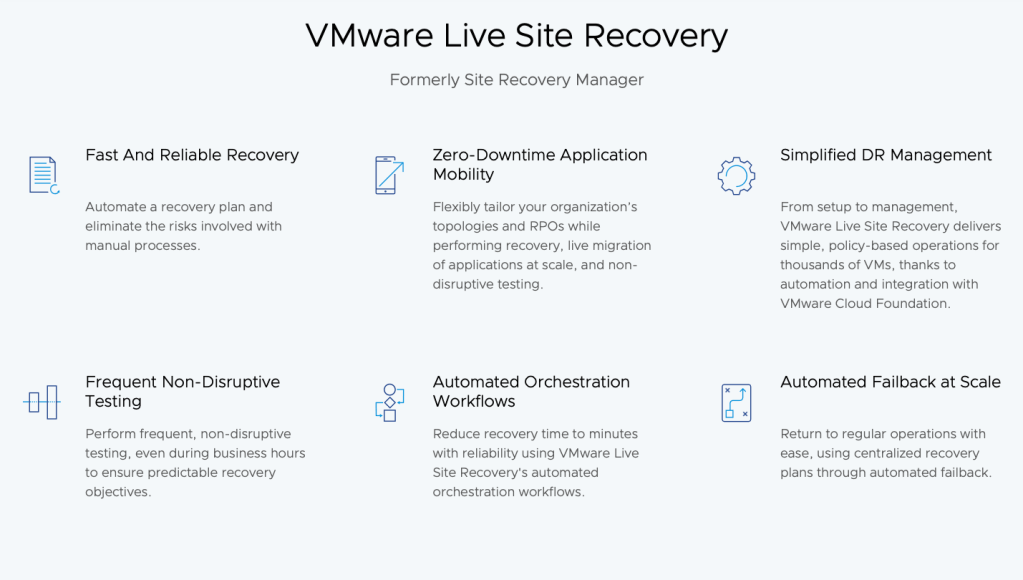
    • VMware Live Site Recovery (formerlyknownasVMwareSiteRecoveryManager) 
VMware Live Cyber Recovery

VMware Live Cyber Recovery is a technology stack under VMware Live Recovery and is an easy-to-use, on-demand disaster recovery (DR) solution, delivered as SaaS, with cloud economics.

Using a simple, cloud-based UI you can configure backup policies to protect your VMs and DR plans to orchestrate the recovery of those VMs. Backups are encrypted and stored in the native vSphere VM format in a highly efficient cloud storage layer called the Scale-out Cloud File System (SCFS) instead of primary vSAN storage in a VMware Cloud on AWS SDDC. When disaster strikes, with a few clicks you can recover your VMs to VMware Cloud on AWS using your pre-tested DR plans. The service can be used to quickly provision VMware resources and SDDCs in VMware Cloud on AWS. The recovered VMs can be immediately powered on using the stored backups via a “live mount”, i.e. an NFS datastore automatically mounted to all hosts in that SDDC.

VMware Live Cyber Recovery’s “live mount” capability provides fast recovery without time-consuming rehydration of the backup data from cloud storage to VMware Cloud on AWS hosts. The backed-up data is immediately available in the recovery SDDC via an NFS datastore mounted to the SDDC hosts. A small deployment of pre-provisioned pilot light hosts makes the recovery process even faster.

VMware Live Cyber Recovery keeps your protected VMs in their native vSphere VM format which eliminates the need for brittle VM conversions that slow down recovery and make failback error-prone.

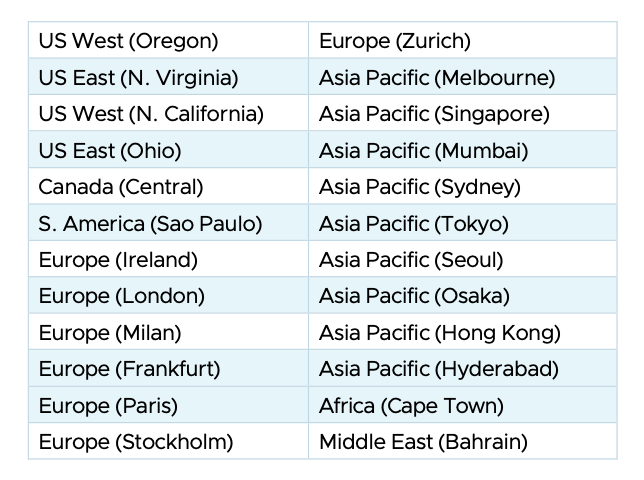
Regions

VMware Live Site Recovery

VMware Live Site Recovery is the industry-leading disaster recovery management solution. VMware Live Site Recovery offers automated orchestration and non-disruptive testing of centralized recovery plans for all virtualized applications.

VMware Live Site Recovery supports on-premises to on-premises disaster recovery.

VMware Live Site Recovery integrates with VMware vSphere through VMware vCenter Server and an underlying replication technology. It can integrate natively with vSphere Replication or with a broad range of storage array-based replication solutions from leading storage vendors through storage replication adapters or VMware Virtual Volumes. VMware Live Site Recovery guides users through the process of configuring recovery plans. At the time of failover or testing, VMware Live Site Recovery automates the execution of the recovery plan.

VMware Cloud Foundation Instance Recovery

The VMware Cloud Foundation Instance Recovery Guide provides guidance on recovering a VMware Cloud Foundation system by performing a complete reconstruction from a backup.

Scenarios
  • Complete site failure
  • Recovery from a malware or ransomware attack
  • Catastrophic logical corruption
VMware Cloud Foundation supported Versions
  • VMware Cloud Foundation 4.4.1
  • VMware Cloud Foundation 4.5.x
  • VMware Cloud Foundation 5.0.x
  • VMware Cloud Foundation 5.1.x
VMware Cloud Foundation Components to Back Up

All important data in a VMware Cloud Foundation system should be backed up to a remote backup site. This includes all VMs in the management domain and VMs in workload domains that require data protection.

After initial bring-up, the management domain contains a core set of VMs to manage the VMware Cloud Foundation system. When you deploy add-on components from the SDDC Manager Dashboard, for example, VMware Aria Automation, VMware Cloud Foundation deploys additional management VMs for those components. Finally, when you deploy a workload domain, VMware Cloud Foundation deploys additional VMs to manage the workload domain.

Backup Guidance

To enable a successful recovery of a VMware Cloud Foundation system, you must have a defined backup strategy.

The processes in this document use the following backup types. For configuring backups, see the guidance in the VMware Cloud Foundation Administration Guide.

VMware Cloud Foundation ComponentBackup Type
vCenter Server instancesFile
SDDC ManagerFile
NSX Manager nodesFile
Documenting the System Configuration of VMware Cloud Foundation

Keeping detailed as-built documentation on the system configuration eases the recovery process if a failure in your VMware Cloud Foundation system occurs.

Keep a record of the following items. Save this information on a secure secondary storage.

  • Topology diagrams of the VMware Cloud Foundation system
    • Physical networking
    • vSphere distributed switch networking
    • NSX networking
    • Workload domain configuration
    • Cluster configuration for each cluster in a workload domain
    • ESXi hosts assigned to each cluster
  • Networking information
    • ESXi host vmnic-to-switch port mappings
    • VM virtual NIC to distirbuted port group mappings
    • IP address information of the VMkernel interfaces on the ESXi hosts
    • IP address information of VMs
    • DNS, NTP, AD, and other well-known servers used by the VMware Cloud Foundation system

VMware Sovereign Cloud

VMware Sovereign Cloud is the most complete and secure solution for data sovereignty that protects against unauthorized access, breaches, or cyberattacks.

By working with verified partners, Sovereign Cloud keeps data completely within the jurisdiction and under the owner’s control, yet isolated from the provider’s core network and the internet.

Along with data independence, protection, management, and control, VMware Sovereign Cloud providers offer local expertise and value-added sovereign cloud services to help organizations comply with regulations and data privacy laws.

The locally implemented and operated sovereign cloud ensures flexibility, choice, and control so you don’t need to worry about vendor lock-in or excessive cost.

Local Residency (Data/Metadata)

All data must reside in the relevant sovereign country and
be subject to and compliance with the applicable local data
protection law(s).

Full Jurisdictional Control

Governmental authorities in the relevant sovereign
country where the data was obtained, have sole
jurisdictional control and power over the data and that it
is not within the legal or technological purview of foreign
governmental bodies, legal authority or access from outside
the sovereign country.

Encryption with external keys to
Clients (BYOK)

Data encryption at rest, network encryption for data in
transit and key management system (KMS) that remains
under the control of the customer or partner within the
respective country.

Local Entity

Managed by a legal entity that will own, operate and
manage the Sovereign Cloud Offering which is located
and incorporated in the applicable sovereign country
where such offering will be made available, and has no
affiliate (including but not limited to, controlling entities,
controlled entities, and entities under common control) or
any corporate relationship with any corporate entity located
outside the sovereign country where the Sovereign Cloud
Offering is made available.

Local Operations

Authorized personnel who operate and manage the
Sovereign Cloud offering to specific individuals who have
applicable sovereign country-specific security clearances
for the applicable sovereign country; and full privilege
access auditing and management.

Resiliency with 2 data center locations
(plus offline Archives)

The Sovereign Cloud Offering is managed and operated from at
least two data center locations within the applicable sovereign
country. The data centers must meet Tier III (or equivalent) or
higher data center classification, per Uptime (99.982% availability
or higher) and backup services with multiple copies.

Full Reversibility (portability without
lock-in)

Support and manage hybrid cloud deployments across different
locations (e.g., customer on-premises and cloud), with a consistent
architecture (such as VCF) that ensure interoperability between
different locations….and ability to migrate workloads to or from
the cloud without changing or reworking applications, with full
reversibility to prevent cloud vendor lock-in.

Security certification

Has relevant industry and/or government certifications
and attestations that the Sovereign Cloud offering holds and
are required in your jurisdiction for end user workloads (e.g.
ISO/IEC 27001, ISO 27017, ISO 27018, CSA STAR, Cyber
Essentials, FedRAMP, SecNumCloud, ENISA, IRAP, ISMAP,
HIPAA, PCI, etc.).

Zero Trust with Logical Network
segmentation

Follow zero trust security posture with logical network
segmentation in and across cloud country consistent with a
common policy framework.

Isolation for some or all parts of the
Sovereign Cloud offering in segregated spaces

Isolation for some or all parts of the Sovereign Cloud infrastructure
in segregated space or environment.

VMware Explore: My Experience and Why You Should Attend

VMware Explore isn’t just a conference, it’s a multi-day deep dive into the future of multi-cloud technology. Last year, I had the privilege of attending this industry giant, and let me tell you, it was an experience I won’t soon forget.

Beyond the Sessions: A Networking Powerhouse

While the keynotes and breakout sessions were packed with valuable insights on the latest advancements in VMware’s offerings, the real magic happened in the hallways. VMware Explore brings together a massive community of IT professionals, industry leaders, and innovators from all corners of the globe. I spent countless hours engaging in stimulating conversations, exchanging ideas, and building connections that have proven invaluable to my career.

Here’s a glimpse of the networking goldmine that awaits you at VMware Explore:

  • Meet the experts: Get face-to-face time with VMware gurus, product specialists, and industry veterans. Pick their brains, ask in-depth questions, and gain a deeper understanding of the technology you rely on.
  • Connect with peers: Mingle with fellow IT professionals from a wide range of industries. Share best practices, troubleshoot challenges, and learn from each other’s triumphs and tribulations.
  • Expand your network: Make valuable connections with potential partners, collaborators, and even future employers. The networking opportunities at VMware Explore are truly unmatched.

Beyond Networking: A Feast of Knowledge

Of course, the core of VMware Explore lies in the exceptional learning opportunities. Here’s what you can expect:

  • Deep dives into cutting-edge solutions: Explore the latest advancements in multi-cloud, application modernization, digital workspace, and more.
  • Hands-on labs: Get your hands dirty with interactive workshops and labs, putting your newfound knowledge to the test in a practical setting.
  • Expert-led sessions: Learn from the best in the business, as industry leaders and VMware specialists share their insights and real-world experiences.

The Bottom Line: Why VMware Explore Matters

Whether you’re a seasoned IT professional or just starting your journey in the multi-cloud world, VMware Explore has something to offer everyone. It’s a chance to:

  • Stay ahead of the curve: Gain insights into the latest trends and technologies shaping the future of IT.
  • Boost your skillset: Refine your technical skills through hands-on labs and in-depth learning sessions.
  • Expand your network: Connect with a global community of IT professionals and industry leaders.

If you’re looking to elevate your career, gain invaluable knowledge, and forge lasting connections within the IT sphere, then VMware Explore is an investment you won’t regret. Trust me, it’s an experience that will leave a lasting impact.

VMware Explore Site:
https://www.vmware.com/explore/us

VMware Ending Cloud Providers Program: What It Means for Partners and Customers


VMware Ending Cloud Providers Program: What It Means for Partners and Customers

In a recent announcement, VMware has revealed that it will be ending its Cloud Providers Program (VCPP) effective April 30, 2024. This move comes as part of Broadcom’s broader reorganization of the VMware business following its $61 billion acquisition in November 2023.

The VCPP was a key program for VMware partners, providing them with access to resources, training, and support to help them sell and deliver VMware cloud solutions. However, Broadcom has decided to streamline its partner program offerings and focus on a smaller number of partners who can provide more comprehensive and differentiated services.

What This Means for Partners

VMware partners who are currently part of the VCPP will need to transition to the new Broadcom Expert Advantage Partner Program (EAP). The EAP is a more exclusive program with fewer partners, but it also offers more benefits, including:

  • Simplified requirements
  • Expanded benefits
  • Direct access to Broadcom executives

VMware will begin inviting partners to join the EAP in early 2024. However, partners who do not meet the new eligibility criteria will not be able to continue selling VMware cloud solutions.

What This Means for Customers

The end of the VCPP may cause some customers to worry about the availability of VMware cloud solutions. However, VMware has assured customers that it will continue to support its existing partners and that they will be able to find solutions from a wide range of vendors.

Additionally, VMware is working on developing new partner programs that will provide customers with more options and flexibility. These programs will focus on helping partners deliver differentiated solutions that meet the specific needs of their customers.

What to Do If You Are a VMware Partner

If you are a VMware partner, you should start planning for the transition to the EAP as soon as possible. This includes:

  • Reviewing the EAP eligibility criteria
  • Evaluating your current business and how it aligns with the EAP
  • Developing a plan to transition your customers to the EAP

VMware will be providing more information and resources to help partners with the transition in the coming months.

What to Do If You Are a VMware Customer

If you are a VMware customer, you should reach out to your VMware partner to discuss the impact of the VCPP ending. Your partner can help you understand your options and ensure that you are able to continue getting the VMware cloud solutions you need.

You should also monitor VMware’s website and social media channels for updates on new partner programs and solutions.

VMware NSX Migration for VMware Cloud Director Tool

VMware by Broadcom has announced that the NSX Migration for VMware Cloud Director tool will be available as an open-source toolkit on its GitHub repository.

Key Highlights of the Open-Source Release

  • Accessibility: The open-source availability of the NSX Migration tool will make it more accessible to a wider range of users, allowing them to customise and extend its capabilities to meet their specific needs.
  • Community Collaboration: By releasing the tool as open-source, VMware invites contributions from the community, fostering collaboration and innovation. This collaborative approach will enhance the tool’s functionality and ensure its ongoing relevance.
  • Enhanced Customization: With the open-source release, users will have the freedom to tailor the tool to their unique requirements, adapting it to their specific NSX environments and configurations.

The NSX Migration tool simplifies the process of migrating from NSX for vSphere to NSX-T Data Center, eliminating the complexities and potential risks associated with manual migrations. It automates many of the tasks involved, ensuring a smooth and efficient transition.

vExpert Overview / How to Apply


The vExpert community is a global network of VMware experts who are passionate about sharing their knowledge and expertise with others. vExperts provide valuable insights and guidance to the VMware community, helping organizations to use VMware technologies to their fullest potential.

What is a vExpert?

A vExpert is a recognized expert in VMware technologies who has made significant contributions to the VMware community. vExperts are nominated by their peers and selected by VMware based on their technical expertise, community involvement, and passion for VMware.

What are the benefits of being a vExpert?

There are many benefits to being a vExpert. These include:

  • Access to exclusive vExpert resources
  • Opportunities to network with other VMware experts
  • Recognition for your contributions to the VMware community
  • The chance to influence the future of VMware technologies

How can I find a vExpert?

The vExpert Directory is a great resource for finding vExperts in your area. You can also search for vExperts on social media using the hashtag #vExpert.

I am a vExpert, how can I get involved?

There are many ways to get involved with the vExpert community. These include:

  • Writing blog posts and articles
  • Giving presentations at user conferences
  • Answering questions in the VMware forums
  • Mentoring new vExperts


The vExpert community is a valuable resource for anyone who is interested in learning more about VMware technologies. If you are passionate about VMware, I encourage you to get involved with the community.

In addition to the above, here are some other benefits of being a vExpert:

  • Early access to new VMware products and technologies
  • Invitations to exclusive VMware events
  • Opportunities to collaborate with VMware employees
  • The chance to have your voice heard by VMware

How to Become a vExpert


To become a vExpert, you must have a proven track record of contributing to the VMware community. This could include writing blog posts, speaking at events, participating in forums, or contributing to open source projects.

If you are interested in becoming a vExpert, you can learn more about the program and apply on the following website.

https://vexpert.vmware.com

In addition to the benefits listed above, becoming a vExpert can also be a great way to give back to the community and help others. vExperts play a vital role in helping to spread knowledge and best practices about VMware technologies.

If you are passionate about VMware technologies and you are looking for a way to get involved in the community, becoming a vExpert is a great option.

I hope this blog post has given you a better understanding of the vExpert community.

If you have any questions, please feel free to leave a comment below.

I would also like to add that the vExpert community is a very welcoming and supportive group. If you are new to VMware, I encourage you to reach out to a vExpert in your area. We will be happy to help you get started.

VMware Cloud Director 10.5.1

VMware Cloud Director 10.5.1 is now available, and it brings a number of new features and enhancements to the cloud management platform. This release is focused on simplifying cloud operations, enhancing security, and improving automation.


Some of the highlights of VCD 10.5.1 include:

  • VMware Cloud Director Cell Certificate Management Through the UI
  • Newly generated self-signed certificates include SubjectKeyIdentifier and AuthorityKeyIdentifier certificate extensions
  • VCD Tenancy Aligned to NSX Projects
  • Provider Topology Intentions

    Advertisement Strict

    Advertisement Flexible

    All Networks Advertised
  • Configuration of NAT and Firewall Service Intentions on a Provider Gateway
  • NAT For Provider Gateway
  • Firewall Rules Configuration on Your Provider Gateway
  • BGP Provider and Tenant Configuration
  • BGP Permission Groups Configuration
  • NSX Advanced Load Balancer Self-service WAF
  • NSX Advanced Load Balancer Virtual Service Logging Analytics
  • DHCP Static Bindings
  • More than one IdP integration with VMware Cloud Director
  • End User License Agreement (EULA) for Container Applications Imported from VMware Marketplace
  • VMware Cloud Director Encryption Management
  • New Organization: Traversal Right
  • Standalone Virtual Machine Metadata Tags
  • The VMware Cloud Director UI displays the current organization name

Here are some additional resources that you may find helpful: