Converting a traditional VMware vSphere environment into a fully automated private cloud using VMware Cloud Foundation (VCF) 9.0 is no longer a “wipe and reinstall” process. With the latest release, you can bring existing infrastructure into the VCF lifecycle via Converge and Import workflows.
This guide outlines the technical requirements and the operational steps to transition your environment to a VCF 9.0 Fleet.
Architectural Approaches
There are two primary methods to transition existing vSphere assets into VCF 9.0:
| Feature | Converge (Convert) | Import |
|---|---|---|
| Primary Goal | Transforms a standalone vCenter into the Management Domain. | Adds a standalone vCenter as a new Workload Domain. |
| Target State | Establishes the first VCF Instance/Fleet. | Expands an existing VCF Instance. |
| Control Plane | Deploys SDDC Manager, NSX, and VCF Operations. | Connects to existing SDDC Manager. |
| Requirement | Highly strict; requires specific vCenter/ESXi versions. | More flexible; allows for post-import remediation. |
Phase 1: Pre-Transition Remediation
Before triggering the conversion, the target vSphere environment must meet specific “VCF-Ready” standards. Failure to remediate these items will cause the automated validation pre-checks to fail.
- vCenter Server: Must be upgraded to version 9.0. VCF 9.0 supports the Reduced Downtime Upgrade method to minimize impact during this phase.
- Lifecycle Management: Legacy “Baselines” are deprecated. Clusters must be transitioned to vSphere Lifecycle Manager (vLCM) Images.
- Networking: While standard switches are supported in some cases, the use of vSphere Distributed Switches (vDS) is highly recommended for NSX integration.
- Services: SSH must be enabled on the vCenter appliance, and vSphere DRS must be active and set to Fully Automated to facilitate host evacuation during updates.
Phase 2: The Conversion Workflow (Management Domain)
The Converge process is handled via the VCF Installer. This tool performs an assessment of the existing vCenter and “wraps” VCF management constructs around it.
- Deployment Type: Select “New Fleet” and toggle the option for “Existing Environment.”
- Inventory Assessment: Provide vCenter and ESXi credentials. The installer will scan the cluster for compliance.
- Validation Engine: The installer runs a deep-dive validation. If errors are found (e.g., incorrect VMkernel settings or unsupported DVS versions), they must be remediated in vCenter before clicking “Rerun Validations.”
- Component Injection: Once validated, the installer automates the deployment of:
- SDDC Manager: The centralized orchestration engine.
- NSX Manager: (If not already present) to handle overlay networking.
- VCF Operations: To manage licensing and fleet-wide monitoring.
Phase 3: The Import Workflow (Workload Domains)
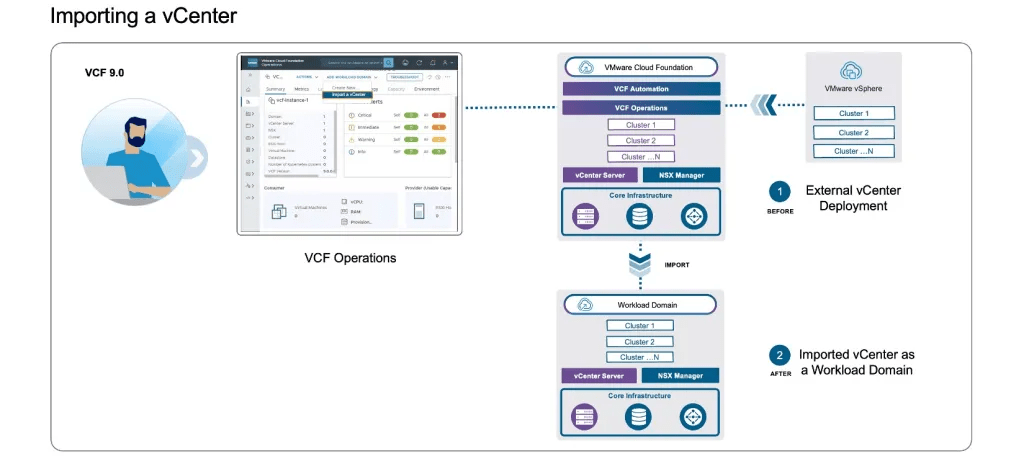
If you already have a VCF 9.0 Fleet and wish to bring a secondary vCenter under its control, use the Import function within the VCF Operations console.
- NSX Integration: During the import, you can specify an existing NSX instance to be shared or deploy a new dedicated NSX manager for that domain.
- Validation: Similar to the Converge process, the Import wizard will generate a validation report. This report highlights specific host-level or networking-level configuration drifts that need alignment with VCF standards.
- Finalization: Upon success, the vCenter is registered as a Managed Workload Domain, enabling SDDC Manager to handle its future patching and lifecycle tasks.
Key Technical Considerations
- Storage Flexibility: VCF 9.0 has expanded support for principal storage. While vSAN remains the standard, you can now utilize NFS or Fiber Channel as principal storage for both Management and Workload domains in certain conversion scenarios.
- Workload Continuity: Because the process utilizes DRS and vLCM, VM workloads remain online during host remediation. The only brief interruption occurs during the vCenter switchover (if upgrading versions), which can be timed within a maintenance window.
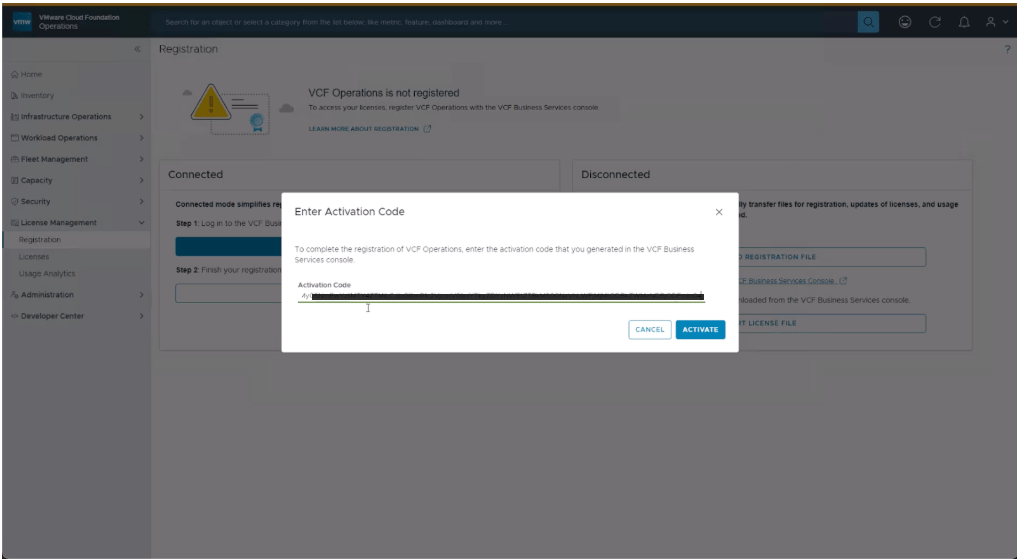
- Licensing: Post-conversion, all licensing is centralized through VCF Operations. Ensure you have your VCF 9.0 keys ready to apply to the newly converted fleet.


 gnunes.cloud