VMware Cloud Foundation (VCF) 9, unveiled at VMware Explore 2024 in Las Vegas, promises to be a game-changer for private cloud infrastructure. With a focus on simplifying deployment, enhancing security, and unifying management, VCF 9 is set to streamline the transition from siloed IT environments to an integrated cloud platform. As businesses gear up for its release—potentially around May 2025—now is the time to prepare. Whether you’re upgrading from an earlier VCF version or starting fresh, this guide outlines actionable steps and best practices to ensure a smooth adoption of VCF 9.

Why Prepare for VCF 9?
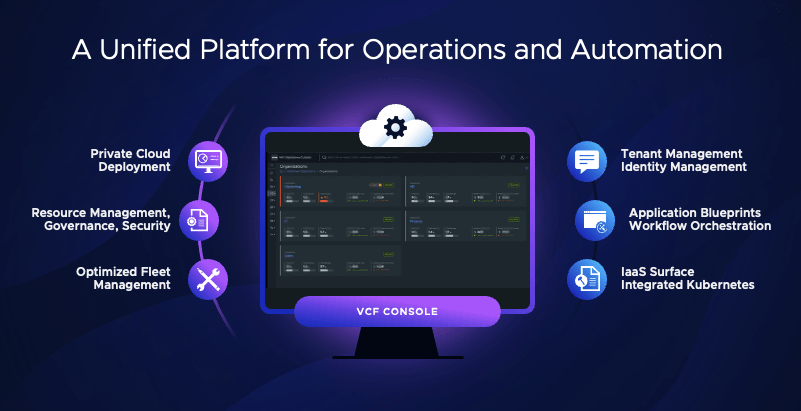
VCF 9 builds on the strengths of its predecessors, integrating compute (vSphere), storage (vSAN), networking (NSX), and advanced management capabilities into a cohesive stack. It introduces platform-wide innovations like simplified installation, enhanced multi-tenancy, and centralized fleet management—features designed to boost efficiency and scalability. Preparing now ensures you can leverage these advancements without last-minute scrambles, minimizing downtime and maximizing value.
Step-by-Step Preparation Guide
1. Assess Your Current Environment
Before diving into VCF 9, take stock of your existing infrastructure:
- Inventory Your Setup: Document your current VMware components (vSphere, vSAN, NSX, etc.), versions, and hardware. Tools like the PowerCLI script for counting cores and TiBs (available from Broadcom’s knowledge base) can help quantify your licensing needs.
- Check Compatibility: Review your hardware against VMware’s Hardware Compatibility List (HCL) for VCF. VCF 9 will likely demand modern hardware for features like vSAN Express Storage Architecture (ESA).
- Evaluate Workloads: Identify workloads you’ll migrate or deploy. Are they compute-heavy, storage-intensive, or network-dependent? This informs your VCF 9 design.
Best Practice: Don’t assume your current setup is ready—validate everything. Misaligned hardware or outdated firmware can derail deployment.
2. Upskill Your Team
VCF 9’s new features—like a simplified installer and unified operations—require familiarity:
- Training: Enroll your IT team in VMware-authorized courses (e.g., VMware Cloud Foundation: Planning, Management, and Operations). Hands-on labs can simulate VCF workflows.
- Documentation: Study existing VCF docs (e.g., the Operations Guide on docs.vmware.com) and monitor VMware’s blog for VCF 9-specific updates post-release.
- Certifications: Aim for VMware Certified Professional (VCP) credentials in Data Center Virtualization to build foundational expertise.
Best Practice: Pair theoretical learning with practical experience. Set up a lab using nested ESXi hosts to mimic VCF 9’s architecture once beta or trial versions emerge.
3. Plan Your Deployment Strategy
VCF 9 emphasizes automation and consistency, so plan accordingly:
- Greenfield vs. Brownfield: Decide if you’re starting anew (greenfield) or upgrading (brownfield). Brownfield upgrades need careful migration planning to minimize disruption.
- Workload Domains: Define your management and VI workload domains. VCF 9’s multi-tenancy enhancements may influence how you isolate tenants or applications.
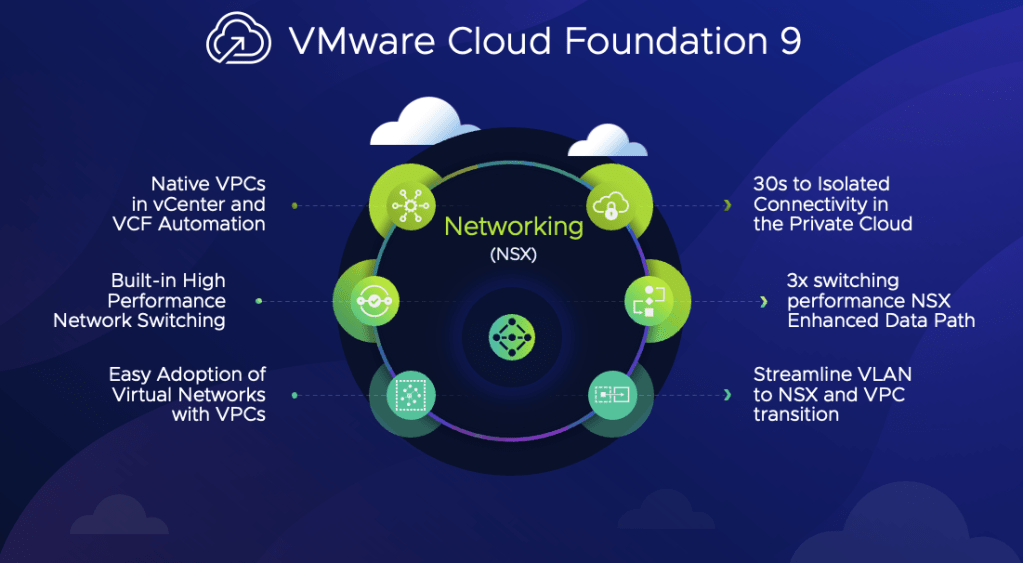
- Networking: Prepare for NSX integration. Ensure your physical network (switches, VLANs) supports VCF’s requirements, especially for vMotion and vSAN traffic.
Best Practice: Stick to VMware’s validated designs. Avoid tweaking settings outside SDDC Manager’s conventions—customizations can break Day 2 operations.
4. Optimize Your Infrastructure
Get your hardware and software in top shape:
- Firmware Updates: Update server BIOS, NICs, and storage controllers to the latest HCL-supported versions.
- Storage Planning: If using vSAN, calculate your raw capacity needs (in TiBs) and account for VCF 9’s entitlement (1 TiB per core for VCF). Purchase additional capacity if needed.
- Licensing: Verify your subscription aligns with VCF 9’s core-based model (minimum 16 cores per CPU). Use Broadcom’s license downgrade/upgrade process if bridging from older versions.
Best Practice: Design for resilience. Size clusters to handle a host in maintenance mode plus a failed host—VCF thrives on availability.
5. Test and Validate
Don’t leap blindly into production:
- Lab Deployment: Deploy an earlier VCF version like 5.2 in a test environment to master the process. Adapt learnings to VCF 9 once available.
- Pre-Checks: Use tools like Cloud Builder’s validation steps to catch DNS, NTP, or IP conflicts early.
- Backup Strategy: Implement a robust backup solution (e.g., BDRSuite or Veeam) to protect workloads during migration.
Best Practice: Simulate failures (e.g., host outages) to ensure your design holds up. VCF 9’s reduced downtime promises won’t matter if your prep overlooks fault tolerance.
6. Leverage Automation and Operations Tools
VCF 9’s unified management is a highlight—prepare to use it:
- SDDC Manager: Master its role in lifecycle management and configuration. Practice JSON-based deployments for repeatability.
- Aria Suite: Integrate Aria Operations and Automation for monitoring and orchestration. VCF 9’s centralized control will rely on these tools.
- Security: Harden your environment with VCF’s built-in certificate and password management features.
Best Practice: Automate wherever possible. Manual tweaks undermine VCF’s “infrastructure as code” ethos.

Key Best Practices for Success
- Standardize: Embrace VCF’s conventions—resist the urge to customize outside supported parameters.
- Document: Maintain detailed records of your design, IPs, and configurations. A JSON spec file is your blueprint.
- Monitor Updates: VCF 9’s release may shift (rumoured for May 2025). Check VMware’s VCF Blog and Broadcom’s support portal for timelines and patches.
- Engage Support: Tap VMware Professional Services or partners for complex migrations—they’ve seen the pitfalls.
What to Do Right Now?
VCF 9 isn’t out yet, but you can:
- Audit your environment and update hardware/software.
- Train your team on VCF fundamentals.
- Build a lab to test an earlier version like 5.2, anticipating 9’s enhancements.
- Draft a high-level deployment plan, refining it as VCF 9 details emerge.

Final Thought
VMware Cloud Foundation 9 is poised to redefine private cloud management with its streamlined deployment and integrated features. Preparing now—through assessment, training, and strategic planning—positions you to hit the ground running. Stay curious, question assumptions, and lean on VMware’s ecosystem to make your transition seamless. The future of your IT infrastructure starts with the steps you take today.


 gnunes.cloud