
VMware today announced the release of VMware Cloud Director 10.5
The new release includes a number of new features and enhancements, including:
- Content Hub – Enhanced Catalog and Content Management
This release introduces a completely new user experience to providers and tenants for accessing application images, such as vApp Templates, ISO files, and container application images in the form of Helm charts. Providers can create and share to tenants catalogs that are backed by the local VMware Cloud Director storage, or populated with application images that are imported from VMware Marketplace and third-party Helm chart repositories. Content Hub merges the existing VMware Cloud Director Catalog and App Launchpad into a unified experience for tenants and providers. Content Hub does not require installing any additional components.
- NSX Federation with VDC Groups
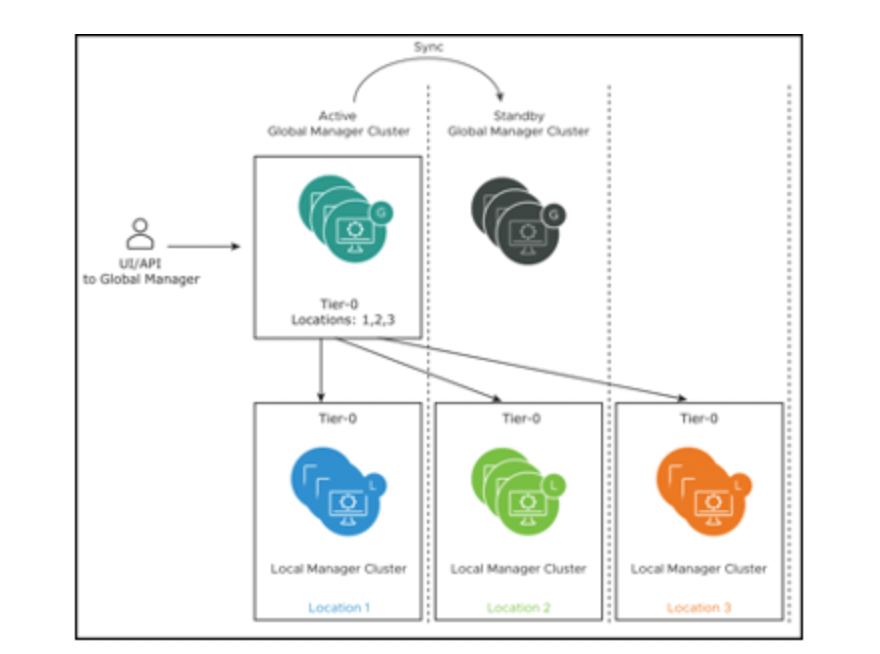
VMware Cloud Director now supports NSX Federation. You can register an NSX Global Manager instance that coordinates security policies across regional local NSX Manager instances in your VMware Cloud Director environment. You can include up to 4 NSX Manager instances in a single VDC Group. Using NSX Federation with VMware Cloud Director is limited to Stretched Tier 0 and Tier 1 Gateways. This means that the provider gateway that is associated with your global NSX Manager instance and with a data center group defines the boundaries of the data center group. By leveraging NSX Federation, you have more choices in establishing networking availability zones by disaggregating NSX Manager instances across regional data centers.
- NSX Advanced Load Balancer HTTP Policies
VMware Cloud Director 10.5 provides a tenant self-service UI for NSX Advanced Load Balancer HTTP policies configuration for virtual services. The functionality includes HTTP request, HTTP response, and HTTP security policies. You can use HTTP request policies to modify requests before they are either forwarded to the application, used as a basis for content switching, or discarded. You can use HTTP response policies to evaluate and modify responses and response attributes that a virtual application returns. Finally, you can also use HTTP security policies to configure allowing or denying certain requests, to close a TCP connection, to redirect a request to HTTPS, to apply a rate limit, or to provide a static page response in case of an outage
- IP Spaces Migration UI Wizard
You can use the IP Spaces Migration UI wizard to migrate any provider gateway in your environment to IP spaces from the legacy IP blocks
- BGP Enhancements
The new BGP route maps tab allows customers to specify additional configurations for route redistribution. The route maps are only available to provider gateways that use IP spaces. You can configure route maps with IP prefixes and community lists that are defined on the provider gateway in the other BGP tabs.
- Improved Firewall Rules UI
VMware Cloud Director 10.5 provides enhanced user experience for firewall rule expressions. You can now create a single firewall rule and, optionally, position it at a specific position in the rules list, and reorder a single firewall rule without editing the entire list of existing firewall rules. You can also add ranges and individual IP addresses directly into the firewall rule Source and Destination text boxes. Firewall rules now have aloggingIdelement that corresponds to the NSXrule_id. - Generation of Autoconfigured Default NAT and Firewall Rules for Edge Gateways and Provider Gateways
If you are using IP spaces, you can generate and apply autoconfigured default SNAT, NO SNAT, and firewall rules on edge gateways and provider gateways in your environment. VMware Cloud Director autoconfigures the SNAT, DNAT, and firewall rules depending on the topology of the relevant IP spaces and their external and internal scopes
- Catalog Publish – Subscribe Performance Improvements
Reduced the time it takes to sync content during in catalog publish-subscribe across Cloud Director instances. The publish – subscribe sync is also more resilient with respect to data transfer disruptions. In our testing catalog sync of a vApp template of size 10 GB that would take over 1 hour to sync in previous releases would now complete in under 15 minutes. This was achieved by breaking up data into chunks and introducing concurrency in data transfer. - Ability to Upgrade Solution Add-Ons and to Publish Solution Add-Ons to Tenants
VMware Cloud Director 10.5 introduces the ability to upgrade your solution add-on instances when a new version becomes available. You can also publish solution add-ons to some or to all of your tenants
- Leverage Shared Datastores Across Multiple vCenter Servers
In earlier releases, when moving VMs across different vCenter Servers, the placement engine did not consider the shared datastores between the vCenter Servers. This resulted in a copy operation involving export and import of the OVF. Starting with VMware Cloud Director 10.5, the placement engine provides shared datastore recommendations to prevent the OVF export and import workflow, and optimizes the move operation by making it faster. - Tenant Migration enhancementsIn previous releases, Migrate Tenant Storage would move the VMs and disks regardless of whether the disks are on the selected source datastores. Starting with VMware Cloud Director 10.5, the operation will only move the disks that are on the source datastores.
- VM discovery enablement at the organization and organization VDC levels
In previous releases, you can configure VM discovery in VMware Cloud Director at the global level, organization level, and organization VDC level but the global level had precedence over the organization level and the organization level had precedence over the organization VDC level. In versions 10.4.x and earlier, if VM discovery is deactivated at the global level, you cannot activate it at the organization or organization VDC level. Starting with VMware Cloud Director 10.5, you can override the global level VM discovery setting at the organization and organization VDC levels. If you use the /api/admin/extension/settings/general API to set theAllowOverrideOfVmDiscoveryByOrgAndOVDCparameter totrue, the organization and organization VDC VM discovery behavior can override the setting at the global level. - vCenter Server can back both a provider VDC and a dedicated vCenter Server instance
Starting with VMware Cloud Director 10.5, a provider administrator can activate two advanced settings so that a vCenter Server instance can back both a provider VDC and a dedicated vCenter Server instance. This is an advanced configuration that exposes risks and must only be activated by experienced VMware Cloud Director administrators.


 gnunes.cloud